 Finn Vu

On this page
Trust with affiliates doesn't start with the first payout. It starts the moment they find your program: your recruitment landing page, sign-up form or outreach email. If your commission and payout terms aren't clear there, affiliates join on guesses, and the first surprise breaks their trust. Most won't tell you why. They'll simply stop promoting your products and move to a brand they trust more.
Your terms need to answer the two questions every affiliate asks: “How much have I earned, and how was it calculated?” and “When will I actually get paid?” Answer them clearly on the first page affiliates see, then keep answering them every payout cycle.
In this guide, we’ll show you how to:
- Make your terms clear from day one: show how commissions and payouts work on your landing page, sign-up form and outreach emails.
- Set a reliable payout schedule: how long to hold commissions, and on which date to pay.
- Make every commission transparent: let affiliates see how each commission was calculated, order by order.
- Handle exceptions without damaging the relationship: denied commissions, refunds, missing sales and late payments.
What Makes Affiliates Trust Your Affiliate Program?
Affiliates need to know two things: how much they’ve earned and when they’ll get paid. They lose confidence when commissions change without explanation or payout dates come and go without an update.
That's what transparency means in an affiliate program: an affiliate can check every number you pay them without having to email you. It starts with what you tell them before they join, and carries through every stage after that.
What Should Affiliates Know Before They Join?
Affiliates should know how they'll earn and get paid before they sign up: the commission rate, what it's calculated on, how long commissions are held and when payouts happen. Clear terms are one of the things affiliates weigh when deciding whether to join, so a program that spells them out up front looks more trustworthy from the start.
Show these terms at every point where you recruit.
1. Recruitment landing page:
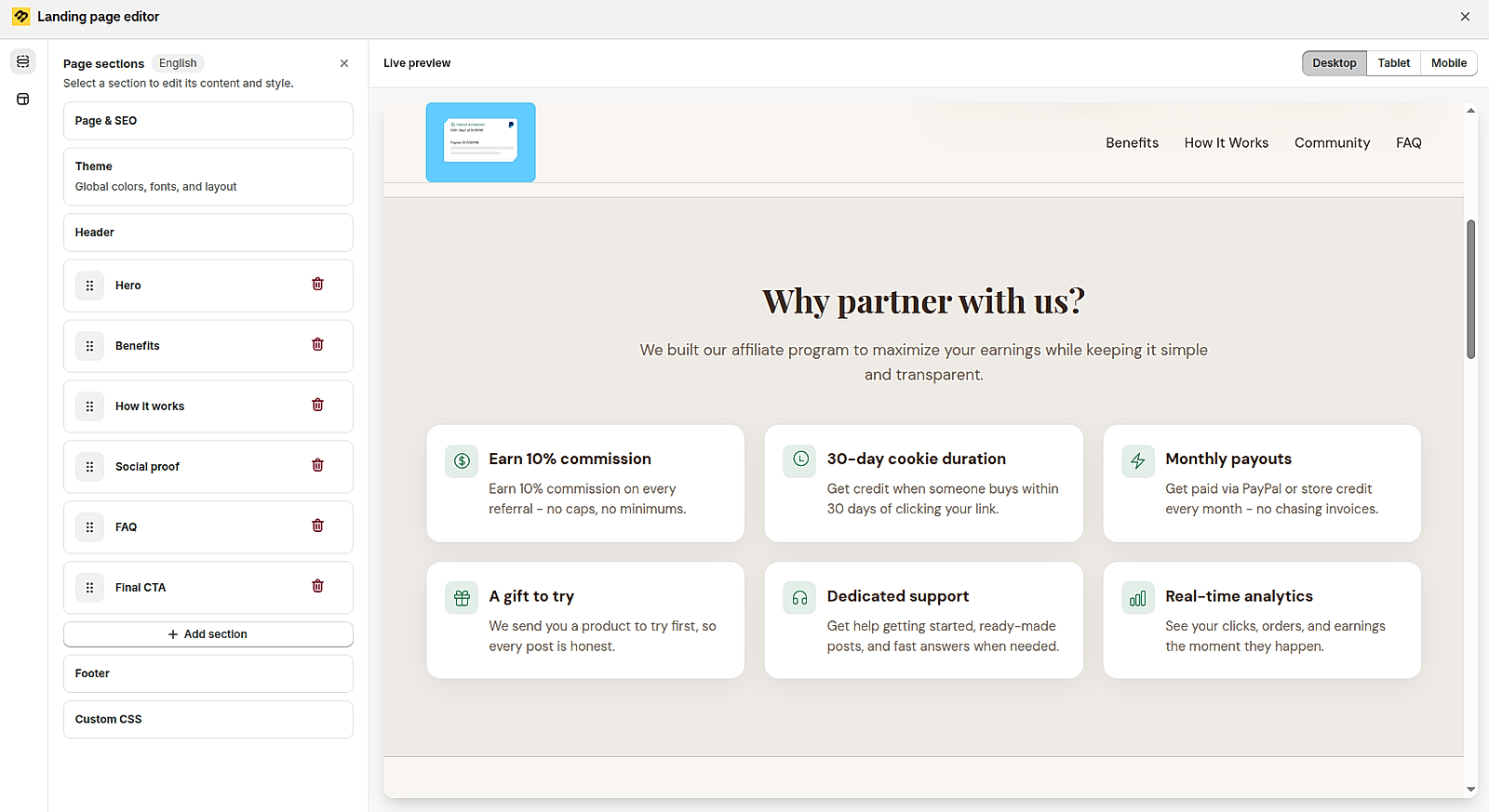
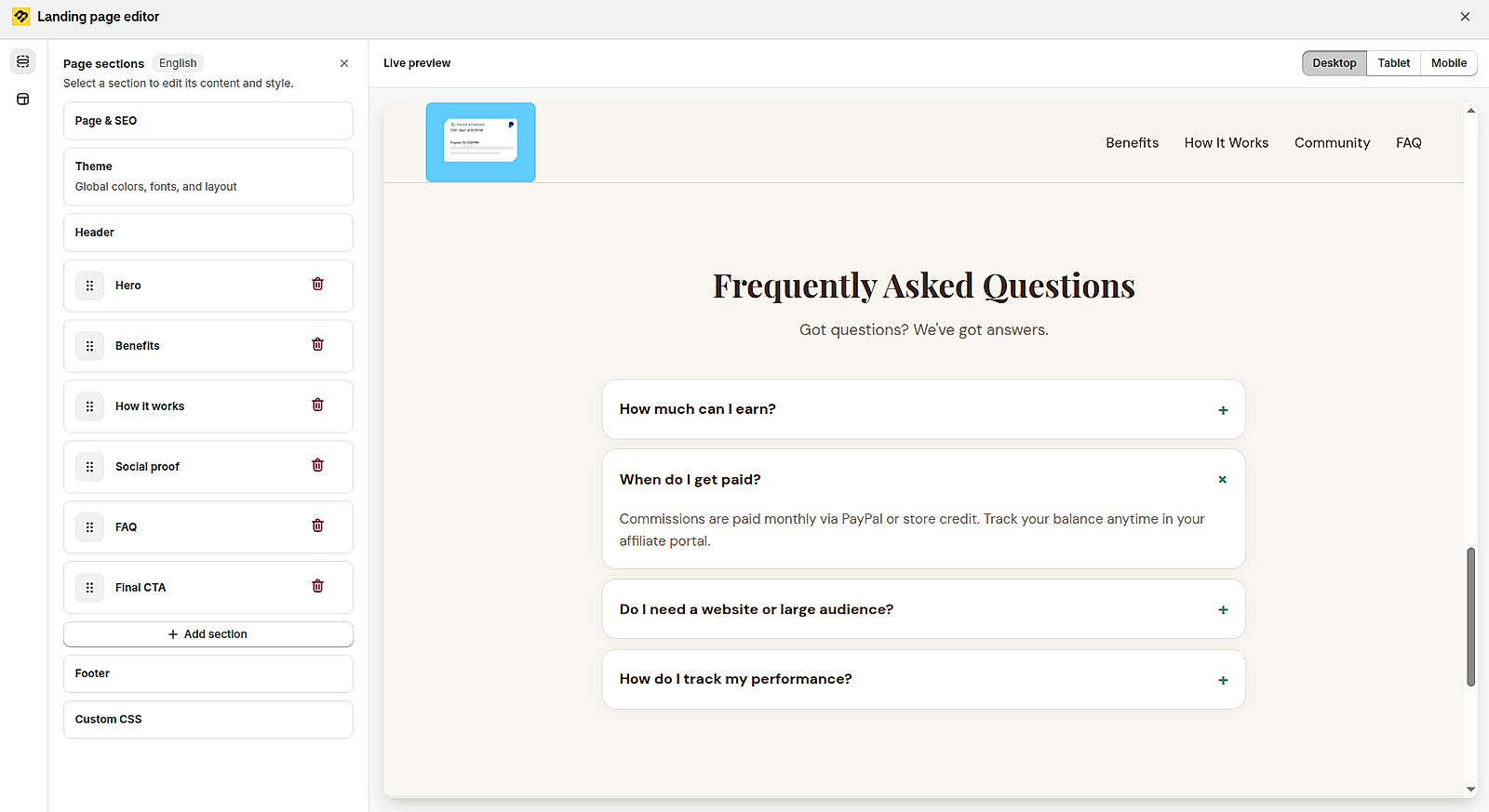
Put the key terms where affiliates decide whether to apply: the commission rate, cookie duration and how often you pay. An FAQ that answers "When do I get paid?" clears up the first doubt before it starts.
In BixGrow, you can build the landing page from sections such as Benefits and FAQ.
2. Sign-up form
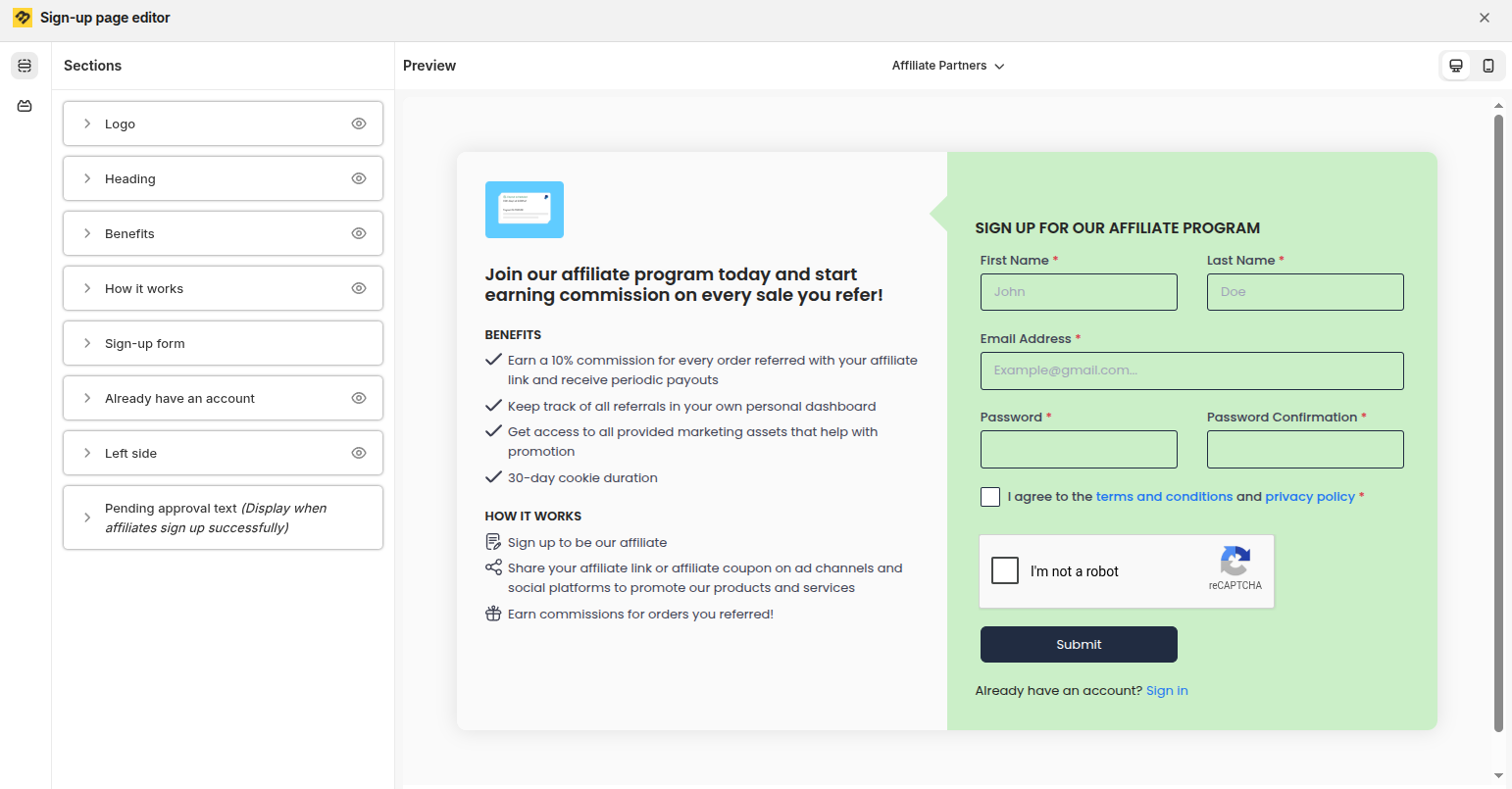
Repeat the key terms next to the form, and ask affiliates to agree to your terms and conditions before they submit.
In BixGrow, the sign-up page has editable Benefits and How it works sections, plus a terms and privacy policy checkbox.
3. Outreach emails
Many merchants send outreach emails with their app's default template, unchanged. That's a common mistake: a generic message usually leaves out key terms like the payout schedule, says nothing specific about the creator, and is easy to ignore.
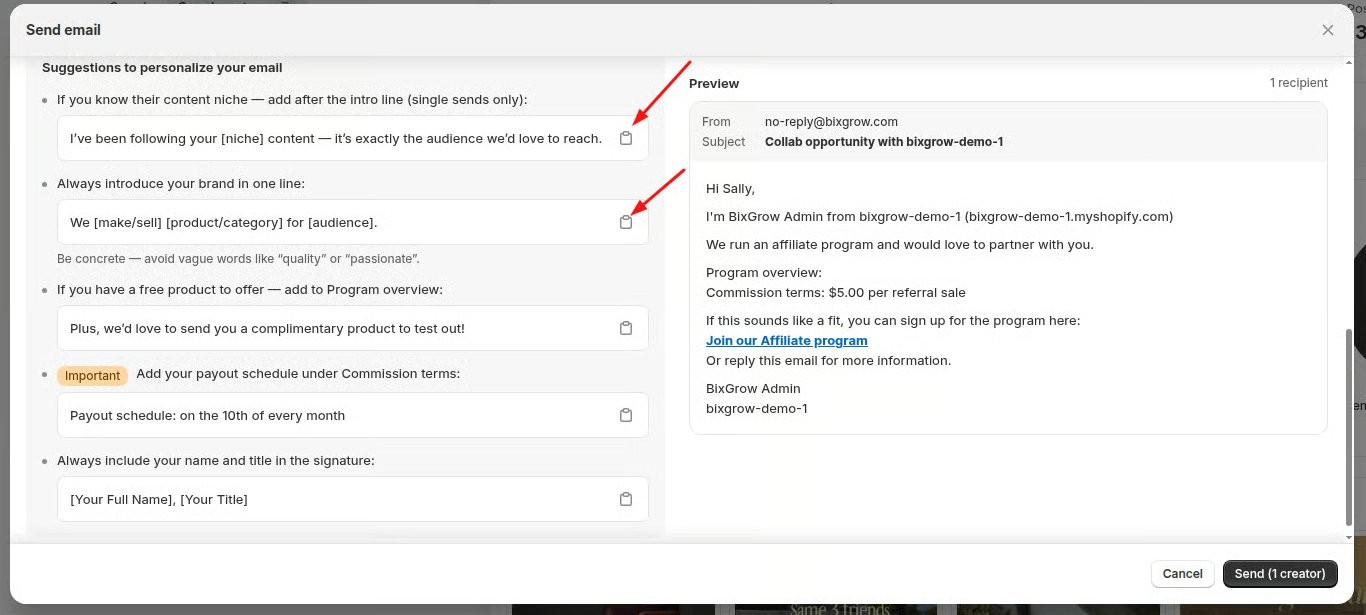
Customize the template so the first email covers your commission, when you pay and why this creator is a good fit.
For example, BixGrow's Creator search comes with a ready-made outreach template that already includes your commission terms. The editor then suggests how to personalize it:
- mention the creator's niche
- introduce your brand in one line
- offer a free product if you have one
- add your payout schedule, such as "Payout schedule: on the 10th of every month."
What Should Affiliates See Once They've Joined?
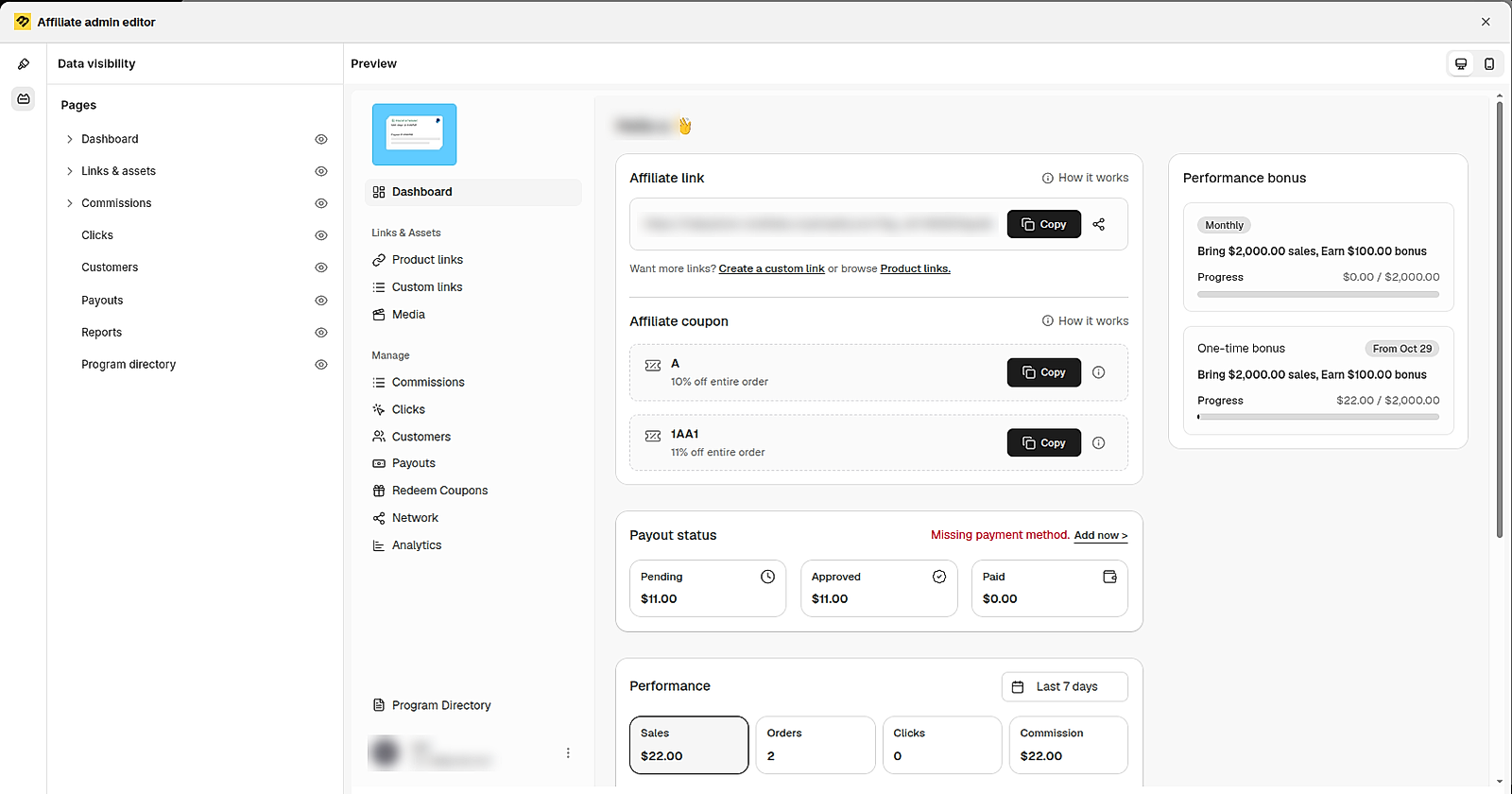
Once affiliates join, transparency moves into their dashboard. That's where they check what each sale earned, which commissions are approved and when the next payout is due, without having to ask you.
So when you choose an affiliate app, check that its dashboard shows these numbers clearly. In BixGrow, for example, you can customize the affiliate admin portal and choose which pages affiliates can see, such as Commissions, Payouts and Program Directory.
1. Program Directory
Give affiliates one page that sums up the rules they joined under: the default commission, how a sale turns into a commission, and any special rates. In BixGrow, this is the Program Directory, which affiliates can open from their dashboard at any time.
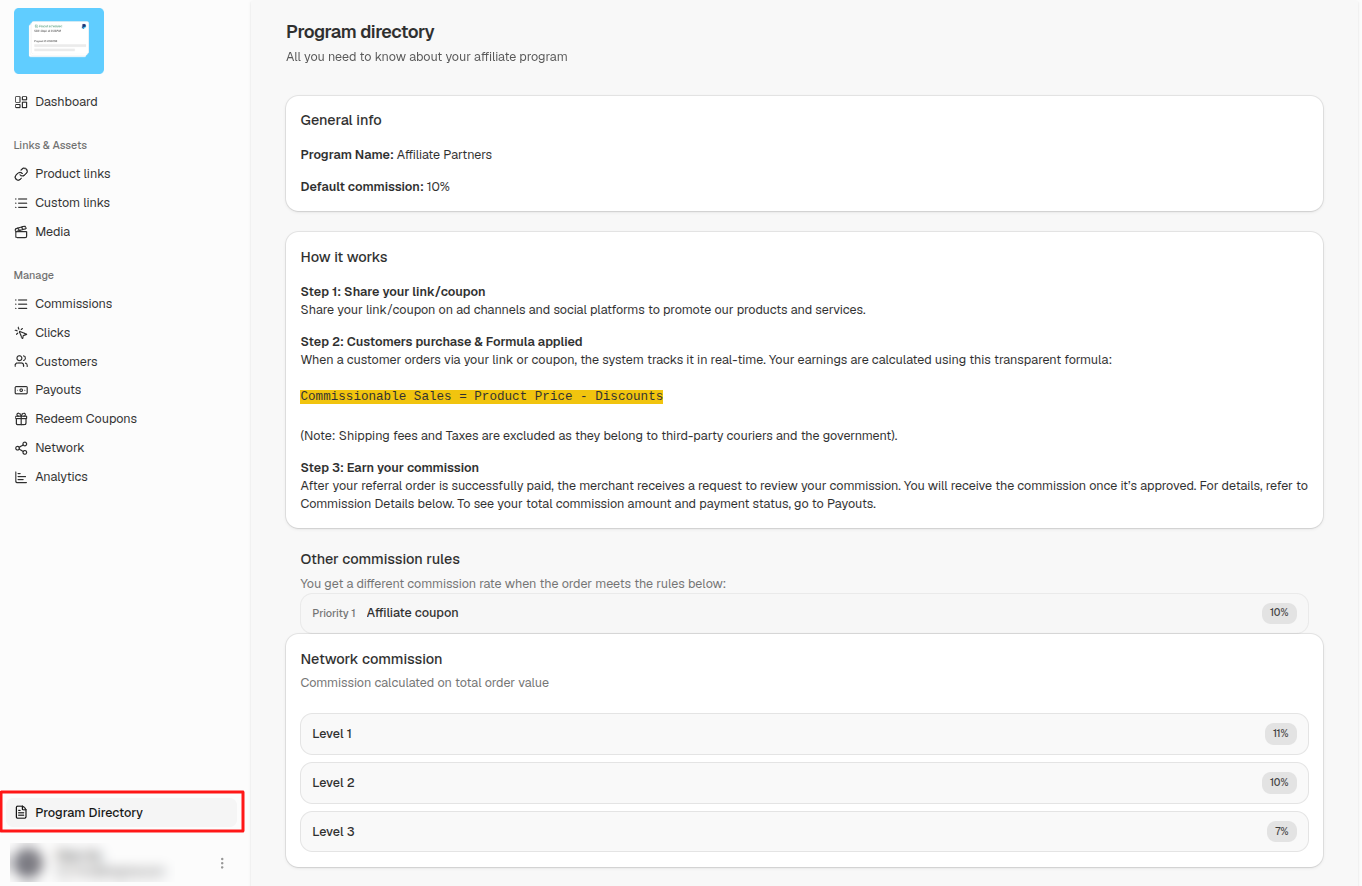
A transparent dashboard answers the questions affiliates would otherwise have to ask you.
| What affiliates can see in BixGrow | The question it answers |
|---|---|
| Payout status: pending, approved and paid totals | How much is waiting, and how much has been paid? |
| Commission total, plus a Commissions page listing each order | How much have I earned, and from which orders? |
| Sales, orders and clicks for a chosen date range | Is my promotion working? |
| Affiliate link and coupon | Am I using the right link or discount code? |
| Performance bonus progress | How close am I to the next reward? |
2. Commissions page
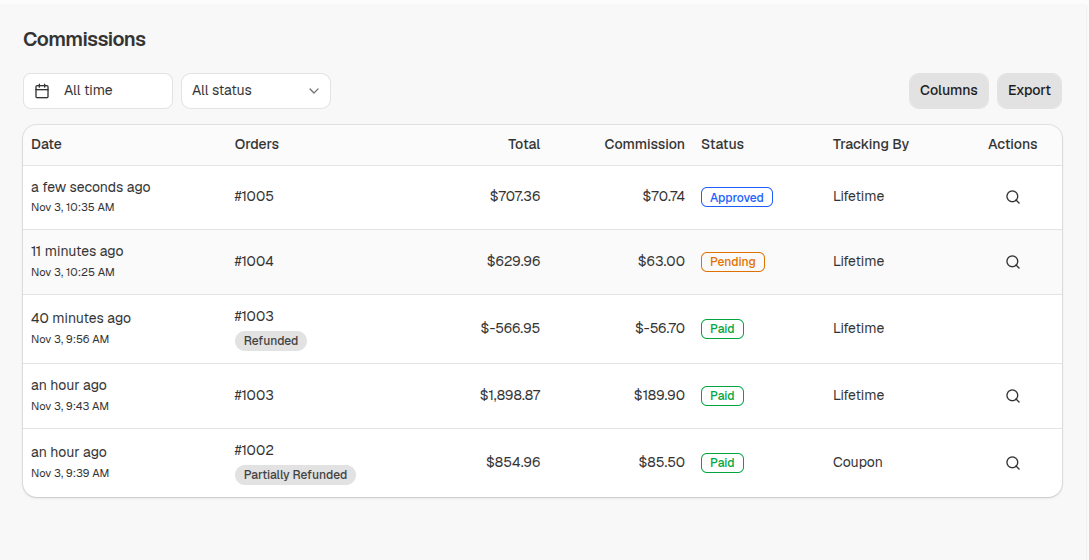
This is where an affiliate checks the money order by order. Each row shows the order, its total, the commission, its status (pending, approved or paid) and how the sale was tracked.
Refunds show up as their own lines too: a fully refunded order appears as a negative amount, and a partially refunded order is tagged, so the affiliate can see exactly why a number changed.
Not sure how a sale was credited to the affiliate? See our guide to affiliate links vs coupon codes.
How Do You Explain Commissionable Sales to Affiliates?
Commissionable sales is the part of the order your rate applies to, usually the product price minus discounts, without shipping or tax. If affiliates don't know this, a smaller commission looks like a mistake.
In BixGrow, affiliates can click the magnifier icon next to any commission to see how it was calculated:
- each product and its commissionable sales
- the commission rate and rule applied
- any manual adjustment made by the merchant
- the total commission
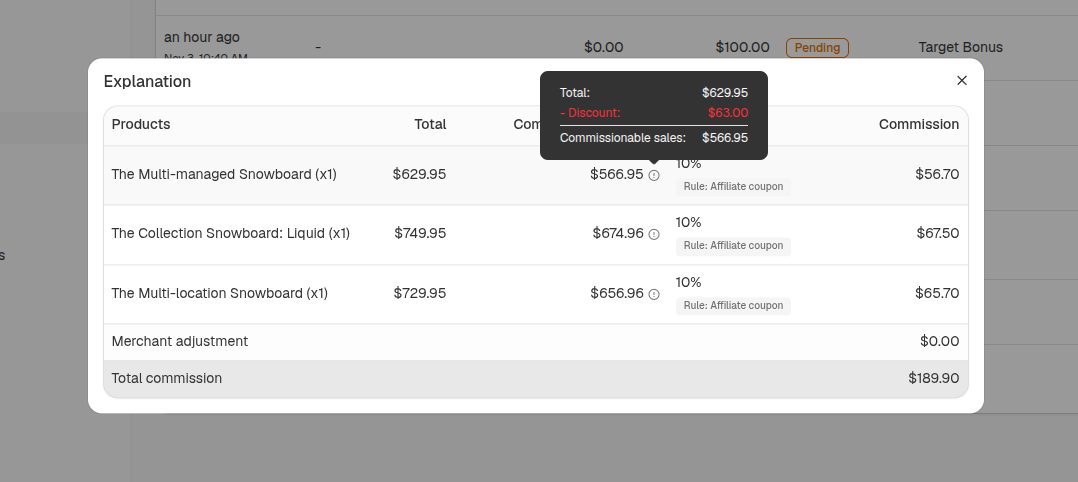
Example: in the order above, the first snowboard costs $629.95. The affiliate's coupon took $63.00 off, so commissionable sales are $566.95, and 10% of that is $56.70. Across all three products, the affiliate earns $189.90.
Don't wait for affiliates to ask how this works. Publish the formula where they'll see it before their first sale. In BixGrow, you can add it to Program Directory, for example "Commissionable Sales = Product Price − Discounts", with a note that shipping fees and taxes are excluded.
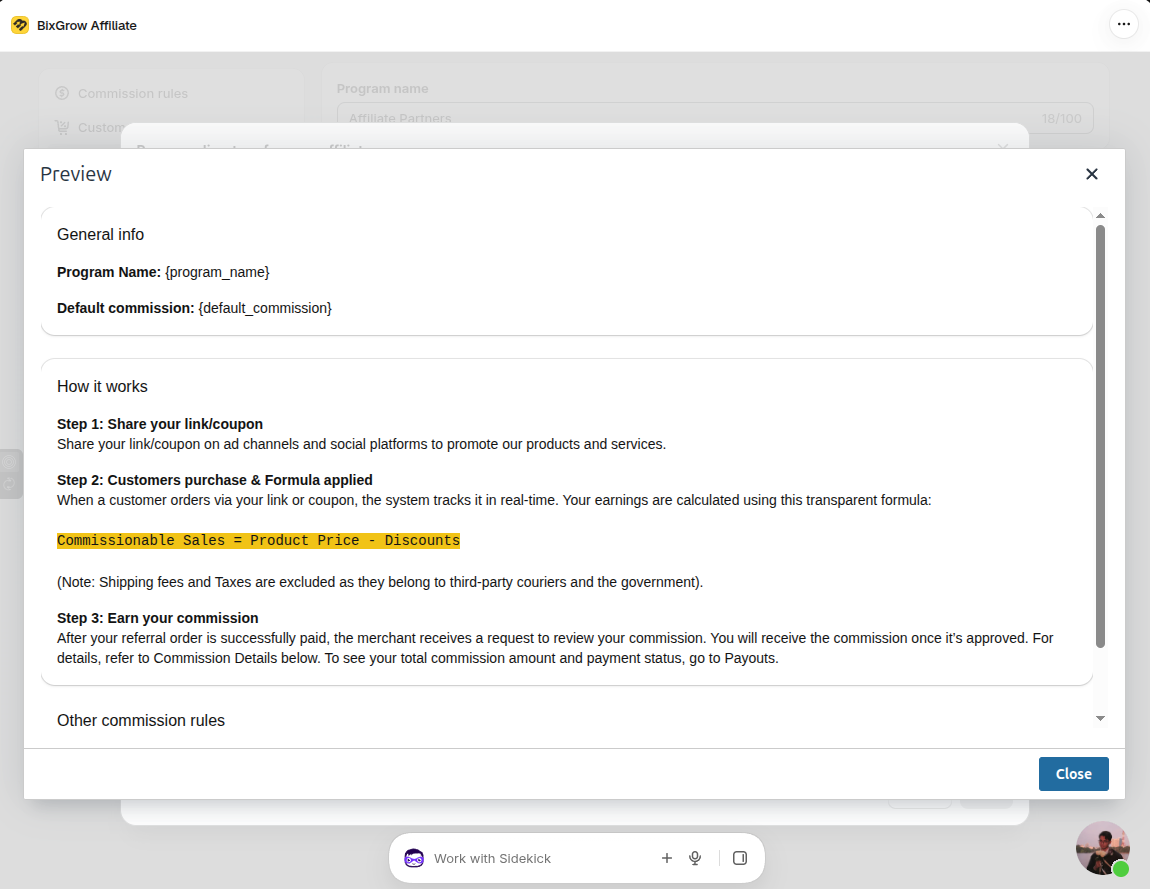
If a payout ever differs from what the dashboard shows, the affiliate should be able to find the line that explains why.
What Breaks an Affiliate's Trust?
Trust breaks when a number changes or a payment slips and nobody explains why. Five situations cause most of it:
- No payout date. The dashboard shows an approved balance, but nothing says when it will be paid.
- Silent denials. A commission is denied and disappears, with no reason given.
- Unexplained deductions. A refund reduces the next payout, but the affiliate can't see which order caused it.
- Moving goalposts. Rates or rules change without notice, or apply to sales already made.
- Payment details chased on payday. The payout is late because the affiliate never added a payment method, and nobody asked earlier.
How Long Should You Hold Affiliate Commissions Before Paying?
You might be wondering: If trust is so important, why hold affiliate commissions at all? Won’t making affiliates wait for their money discourage them from promoting your store?
Not necessarily. A commission hold period serves a practical purpose: it gives you time to check whether an order is valid before paying out the commission. Without it, you could end up paying commissions on orders that are later refunded, canceled, or disputed.
The right hold period depends on how your store handles orders and returns. For example:
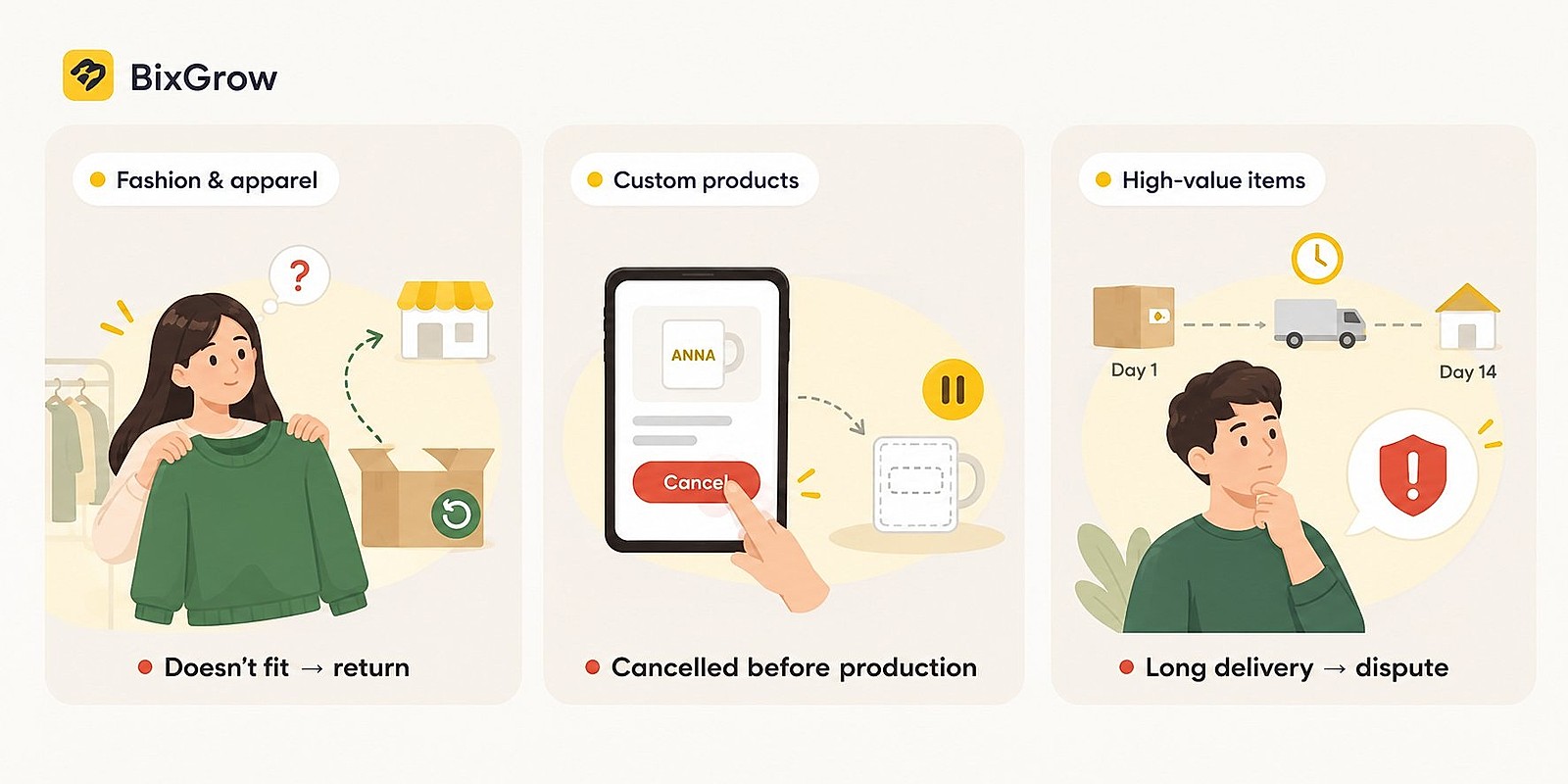
- Fashion and apparel stores: Customers may return items because they don’t fit or meet their expectations. A hold period gives you time to account for eligible returns before approving commissions.
- Custom or personalized products: Customers may cancel before production begins. Holding commissions gives you time to confirm whether an order will proceed, based on your cancellation policy.
- Stores selling high-value products or with longer delivery cycles: Orders may take longer to fulfill, and cancellations or disputes may arise later. Your hold period should account for these risks without delaying every affiliate’s payment unnecessarily.
These are examples, not fixed rules for every store. Look at your own refund, cancellation, and chargeback patterns to decide how much time you need before approving commissions.
Just as importantly, explain your policy upfront. Tell affiliates how long commissions are held, how refunds and cancellations affect their earnings, and when approved commissions are paid.
When affiliates know what to expect, a hold period is less likely to feel like an arbitrary delay. It becomes a clear part of your program’s terms, and helps protect both your business and your affiliate relationships.
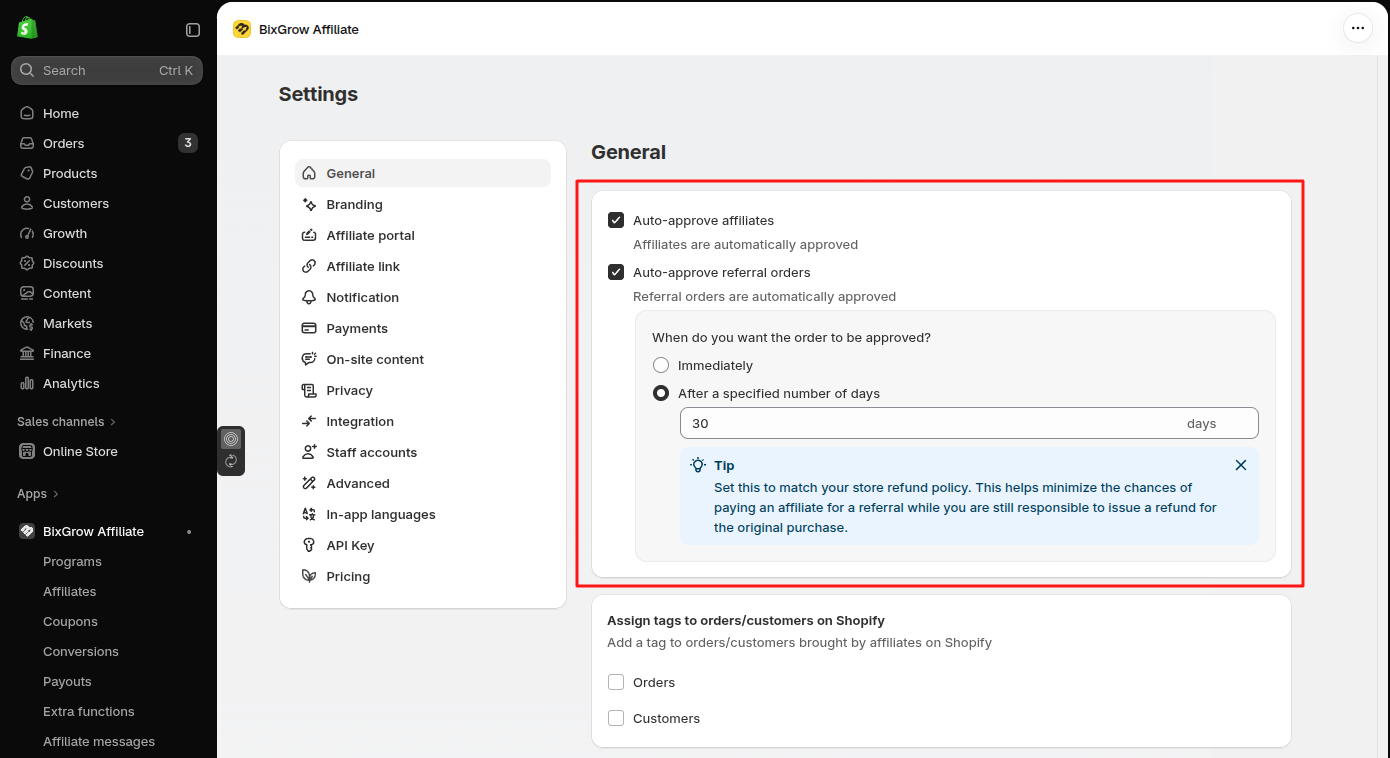
For reference, Shopify Collabs holds creator commissions for 30 days by default, and merchants can set it anywhere from 1 to 90 days. In BixGrow, you can approve commissions automatically after a set number of days, so the hold runs on its own once you've chosen the length.
Is a Hold Period the Same as a Payout Schedule?
A hold period and a payout schedule are two different waits. The hold period is how long a commission waits before it's approved; the payout schedule is when approved commissions are actually paid.
Affiliates feel three waits in a row:
- Hold period: the days before a commission is approved.
- Payout schedule: the wait until your next payout date.
- Payment terms: how long the money takes to arrive with the payout method you use.
So how long do affiliates actually wait? Across 9,798 commissions paid by 430 BixGrow stores, half were paid within 2 days of the order, and 87% within a week. Most stores approved commissions the same day the order came in, so nearly all of the wait was the payout schedule. About 4% of commissions waited more than 30 days, which matches stores that hold commissions for a month.
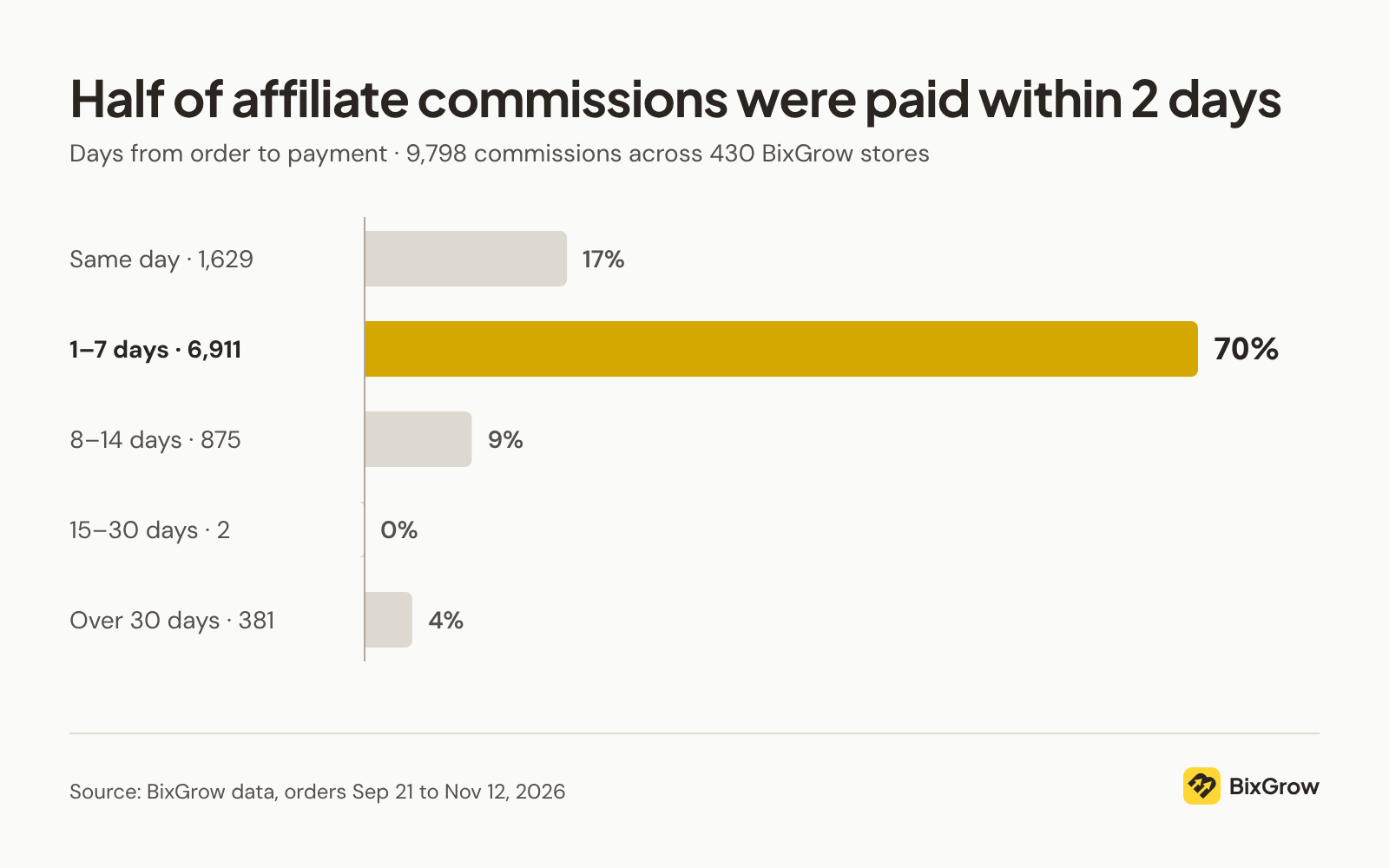
Paying that fast keeps affiliates happy, but it skips the refund check. If you approve commissions as soon as the order comes in, say in your terms how refunds after payout are handled, as covered in the FAQ on returned orders below.
Tip: Publish both numbers in your program terms, for example: "Commissions are approved 30 days after the order and paid on the 5th of each month."
How to Pay Affiliates on Time: Set Up a Reliable Payout Process
Setting a reasonable holding period is only half the job. You also need a reliable process for approving commissions, collecting payment details, and sending payouts on schedule.
Without a clear routine, it’s easy to miss a payment date, overlook an affiliate, or mark a payout as complete before the money has actually been sent. Here’s how to set up a process you can follow every payout cycle.
How to Set Up a Reliable Affiliate Payout Process
1. Publish your commission and payout terms.
Make sure your terms are written down and easy to find before payday comes around. For what to include, see What Should Affiliates See Once They've Joined?
2. Set your commission holding period.
Choose a period that gives you enough time to account for refunds and cancellations before approving commissions.
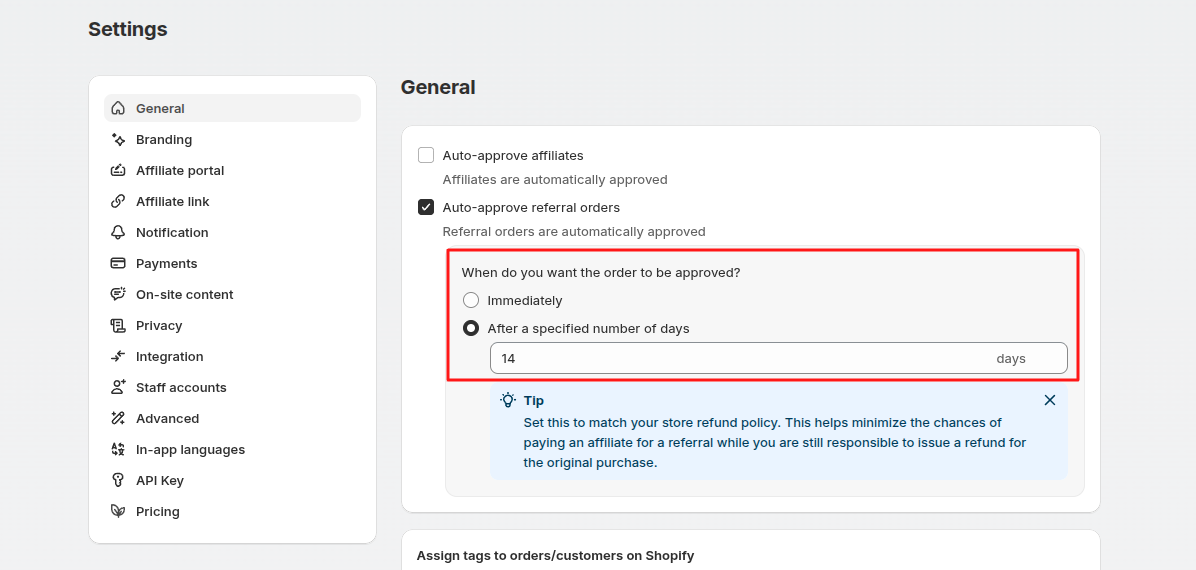
In BixGrow, you can auto-approve referral orders after a set number of days, so commissions are approved automatically once your hold period ends.
3. Collect payment details early.
Ask affiliates to provide their preferred payment method and required details when they join, rather than waiting until payday.
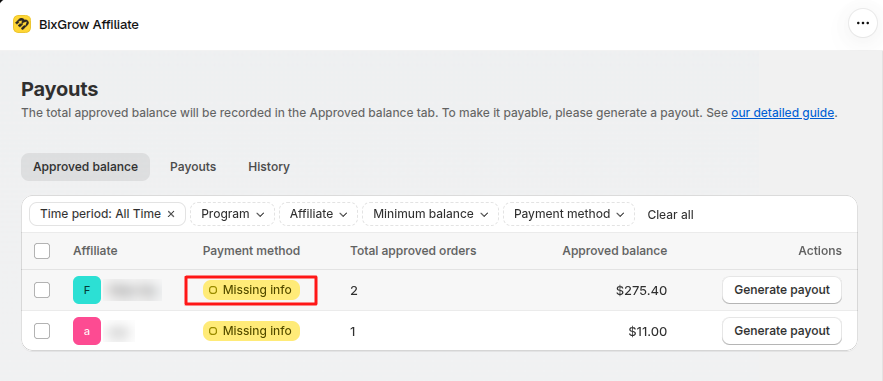
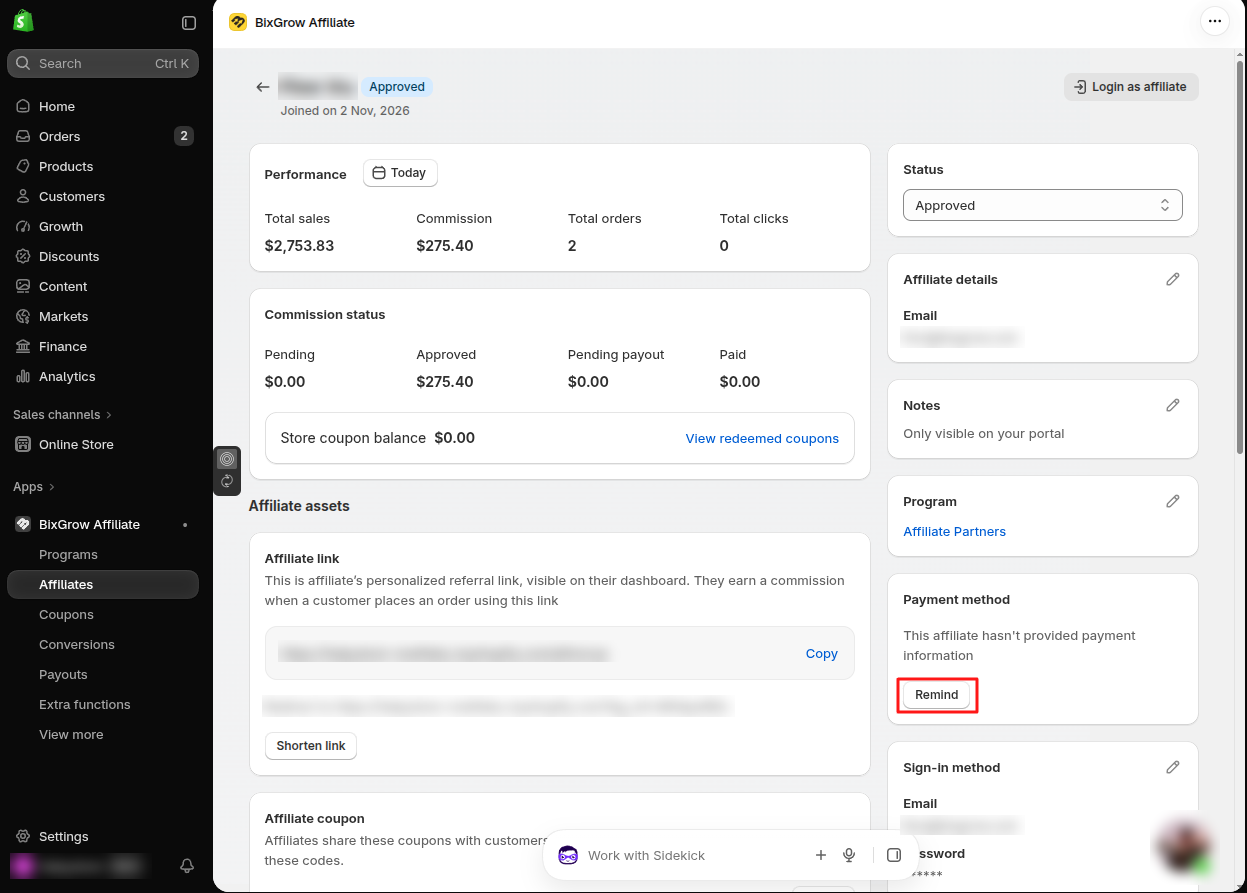
BixGrow flags affiliates who haven't added a payment method, so you can send them a reminder well before payday.
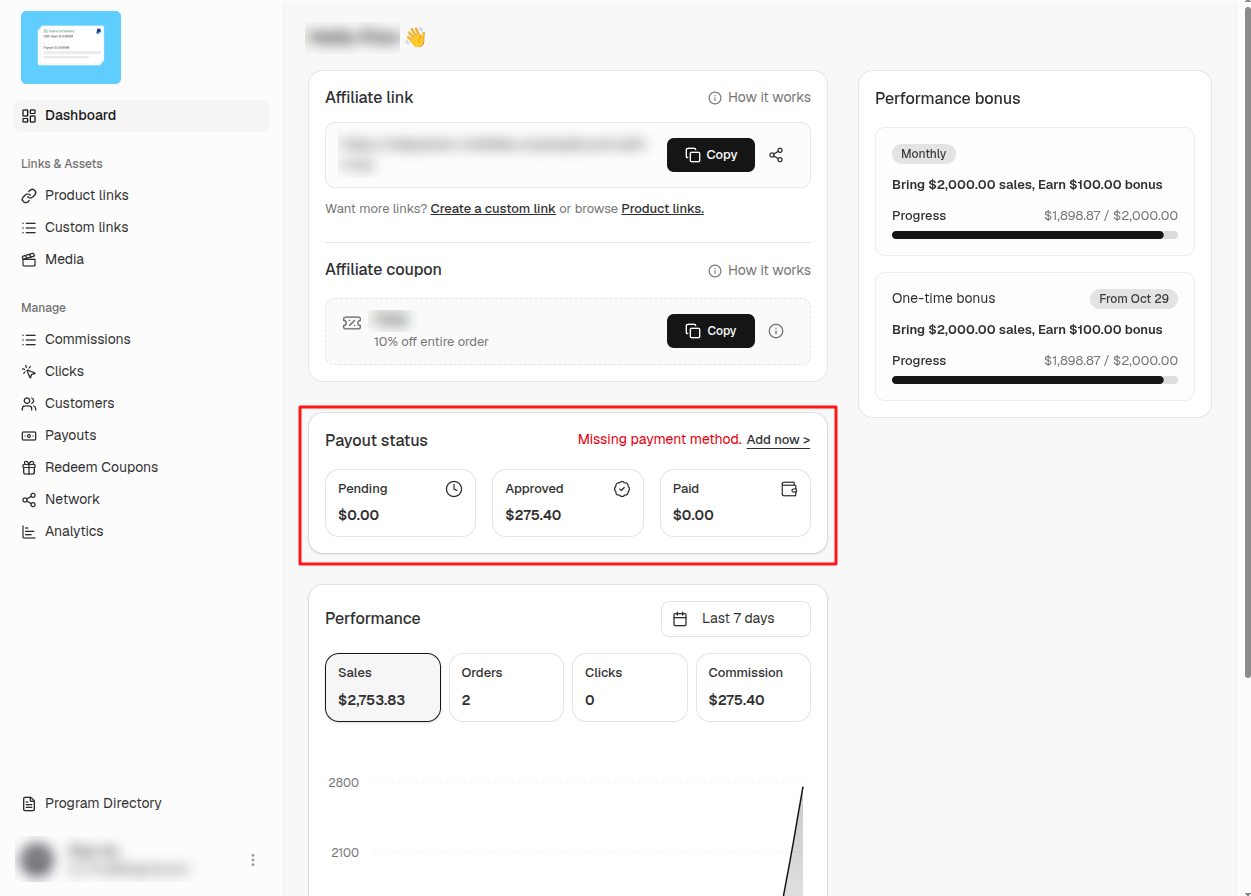
Affiliates see the same warning on their own dashboard, with an Add now link to fill in their payment details.
4. Set a fixed payout schedule.
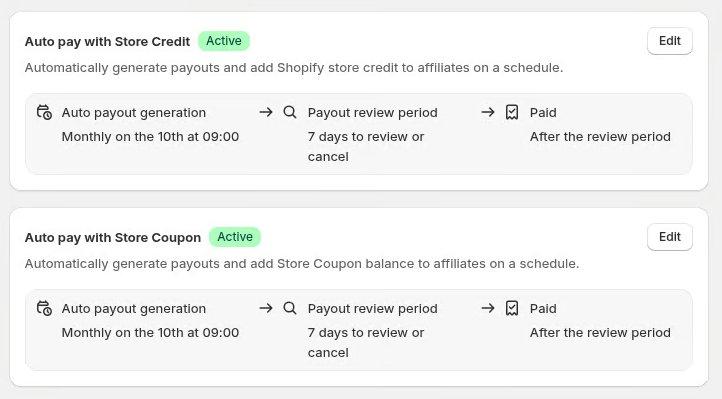
Choose a consistent payout date, such as a specific day each month, or automate eligible payouts if your app and payment method support it.
Whether you can automate payouts depends on your app and pricing plan, so check this before you promise affiliates a fixed date.
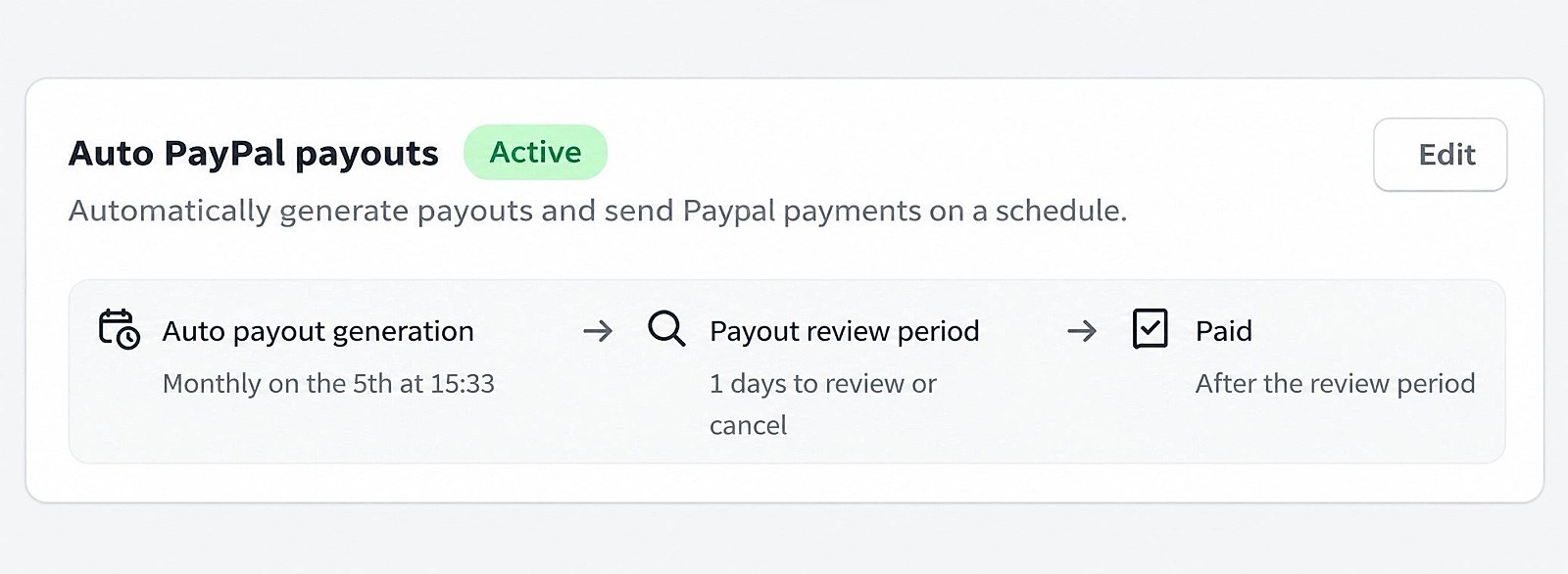
In BixGrow, automated payouts via PayPal, store coupons or store credit are available on the Advanced plan for $49.99/month.
Never miss a payout date
Set your schedule once, and BixGrow sends affiliate payouts via PayPal, store credit or store coupons weekly or monthly, with a review step before the money goes out.
Automated payouts can run weekly or monthly, with a minimum and maximum balance and an optional review period to check payouts before the money goes out.
5. Verify that every payout is completed.
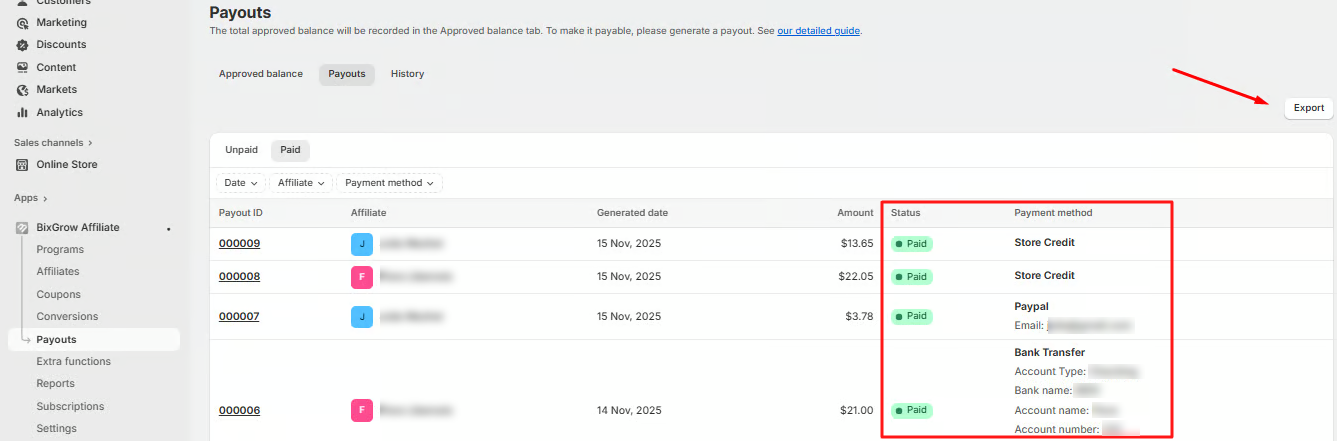
Check each payout record and confirm that the money was actually sent. Creating a payout record or marking a commission as paid doesn’t necessarily mean the transfer succeeded.
In BixGrow, for example, every commission payout is recorded with its status and payment method, whether you paid it in the app (PayPal, store credit or store coupon) or outside it as an external payout, such as a bank transfer. You can also export the list for your records.
6. Make sure your payment account is funded.
If you use PayPal Payouts, check your available balance and payment setup before payday to help prevent failed transfers.
Which Payout Method Should You Offer Affiliates?
Choose payout methods based on who your affiliates are and where they live, not on what's easiest for you. For each option, check whether affiliates can receive it, what it costs, how long it takes, and whether you can match it to your records.
| Affiliate group | What matters most | Method to consider | Watch out for |
|---|---|---|---|
| Creators in your main market | Low fees and a method they already use | Bank transfer or PayPal | Collecting bank details securely |
| International creators | A method that works in their country | PayPal | Fees and currency conversion vary by country |
| Large partners and publishers | Reliable transfers and clear payment records | Bank transfer | More manual work per payout |
| Customers who refer friends | Low effort, no minimum to reach | Shopify store credit | It can only be spent in your store |
Whichever methods you offer, put the costs and limits in your terms. PayPal charges a percentage fee on each payout, with a cap that varies by country, and a minimum payout keeps you from sending dozens of tiny transfers. If you set one, say what happens to smaller balances, for example that they roll over to the next payout date.
In BixGrow, you can offer several payout methods, including PayPal, bank transfer (as an external payout), store credit and store coupons, and each affiliate picks the one that suits them.
Rewarding customers who refer friends with store credit? Here's how to set up a referral program for a small business.
How to Handle Denied Commissions, Refunds and Late Payments
Even with clear terms, some commissions will be denied, reduced or paid late. A denied commission doesn't break trust; an unexplained one does. When it happens, tell the affiliate which order is affected, why, and what happens next.
If you're not sure what to say, start from these:
| Situation | What to tell the affiliate | Example message |
|---|---|---|
| A commission is denied | The order, the reason and the rule it falls under | "Order #1042 was a self-purchase, which our terms don't pay commission on." |
| An order is refunded before payout | That the commission was reduced to match what the customer kept | "The customer returned one of two items, so your commission on #1043 is now $4.25." |
| An order is refunded after payout | The amount, and which future payout it comes off | "#1043 was refunded after you were paid, so $4.25 will come off your next payout." |
| An affiliate says a sale is missing | What you checked, and what you found | "The customer used another affiliate's code, so that affiliate got the credit." |
| A payout will be late | The new date, before the old one passes | "This month's payout will go out on the 8th instead of the 5th. Your balance is unchanged." |
What Else Should Your Affiliate Terms Cover?
Your terms should already explain how commissions are calculated and when you pay. Beyond those basics, a few rules are often left out of affiliate terms, and they're the ones that cause the most disputes later.
Make sure your terms also say:
- Why a commission can be denied or reduced: self-purchases, cancelled orders, refunds and orders outside the program rules.
- How affiliates may promote you: for example, no bidding on your brand name in search ads.
- How rate changes work: how much notice you give, and that new rates apply only to orders placed after the change.
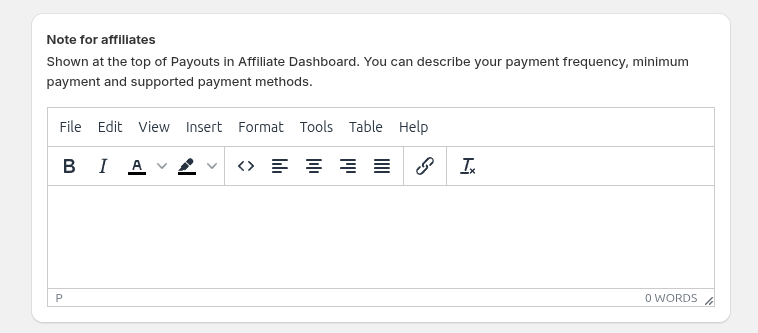
With BixGrow, you can also add a Note for Affiliates that appears at the top of the Payouts page in their dashboard. Use it to explain your payment frequency, minimum payout, and supported payment methods, so affiliates know what to expect when receiving their earnings.
Final Thoughts
Affiliate trust starts before anyone joins, with clear terms on your landing page, sign-up form and outreach emails. Once affiliates are in, it depends on visibility: when they can see their earnings, the orders behind them and how each commission was calculated, they don't have to take your word for it.
Next comes timing. Hold commissions only as long as your refund and cancellation risk requires, pay on a fixed date, and collect payment details early so nothing delays payday.
Your payout methods should fit the affiliates you work with. Whatever you choose, explain it clearly, along with what happens when a commission is denied, refunded or paid late.
Finally, keep it all in one set of written terms that affiliates can check at any time.
Get these right, and affiliates will know exactly what they've earned and when they'll be paid. That's what keeps them promoting your store. For more ways to keep your program healthy, see our tips on how to manage affiliates.
FAQs
Pay every affiliate on time, and show them why
BixGrow shows affiliates how each commission was calculated, approves commissions after your hold period and sends payouts on schedule. Free plan available.