 Finn Vu
On this page
If you're looking for a Shopify affiliate app, you've probably come across UpPromote. It has been on the Shopify App Store since May 2019, has 3,936 reviews averaging 4.9 stars, and runs affiliate, influencer and customer referral programs from one app. It also offers 24/7 live chat and a creator search add-on for Instagram, TikTok and YouTube.
So why consider BixGrow? UpPromote's paid plans add a share of every approved referral sale to the monthly price, while BixGrow charges a flat monthly price that stays the same as your program grows. BixGrow also gives you a section-based landing page with a commission slider, a refer-a-friend program that rewards customers automatically in Shopify store credit, and creator search built on Meta's own data (in beta). UpPromote still suits brands that run several Shopify stores and merchants who want creator search on TikTok and YouTube.
Both apps are Built for Shopify, hold 4.9 stars, offer a 14-day trial and bill through Shopify, so the sections below spend their words on where the apps differ: pricing, creator search, the affiliate experience, referral programs, payouts, scaling and support.
Short on time? Jump to the summary table, or try BixGrow free.
Affiliate tracking and coupon leaks prevention
UpPromote and BixGrow track and protect affiliate sales the same way. Both apps offer:
- Tracking through affiliate links, coupon codes and the customer's email
- Links to any product or collection, plus custom links
- Coupon codes created automatically for new affiliates
- The affiliate's discount applied automatically when a shopper arrives through their link
- Anti-leak discounts that work only for shoppers who clicked the affiliate's link, so a code posted on a coupon site is useless
- Lifetime tracking that ties a customer to the affiliate who first referred them
Even. Both apps credit sales the same ways and protect codes with anti-leak discounts.
Want to find out how links and codes each credit a sale? It's all covered in our guide to affiliate links vs coupon codes.
Commission setup
Both apps let you run multiple affiliate programs, each with its own settings and commission structure, so you can tailor offers to any campaign, market or affiliate group.
Both offer the same commission toolkit:
- Percentage or flat rates, per order or per item
- Special rates for products and collections
- Lifetime commission
- Separate rates for new customers and for orders with a coupon
- Automatic tiers, performance bonuses and gifts
- Commission on subscription renewals
Which plan unlocks each one is in the Pricing table.
Even. Both apps can pay affiliates the same ways; only the plan that unlocks each tool differs.
Recruiting affiliates
Both apps list your program in a built-in affiliate marketplace and let affiliates recruit others through multi-level marketing.
The difference is creator search: UpPromote sells Creator Discovery as a separate add-on for Instagram, TikTok and YouTube, while BixGrow's Facebook creator search uses Meta's own data, sends invitations from inside the app, and is in beta with no price yet.
UpPromote: Creator Discovery
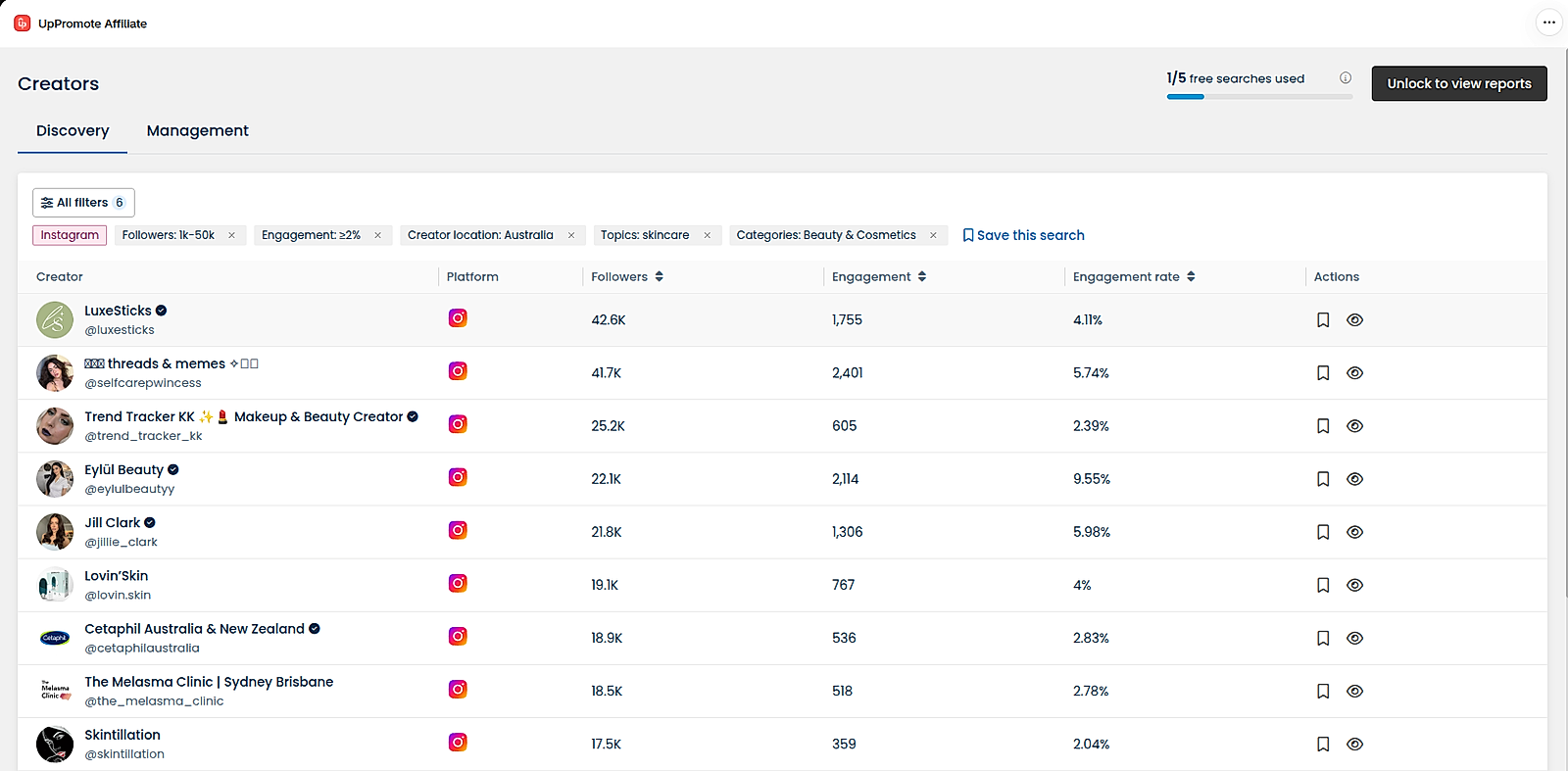
Launched in July 2026, UpPromote lets you search Instagram, TikTok and YouTube by username, email or filters such as niche, location, follower count and creators with an email on file. Results show each creator's followers, engagement rate and main audience location. The audience breakdown and fake-follower estimate appear only when you open a profile, which uses one view from your quota.
Without the paid add-on, you get 5 searches every 30 days. Discovery Starter costs $39/month for 35 profile views and Discovery Pro $79/month for 75, both with unlimited searches. Unused views don't carry over, and the charge appears separately on your Shopify bill (pricing details).
Saved creators go to a management list where you move them from Saved to Contacted, Negotiating and Ended. There's no outreach tool yet, so you contact each creator by email or DM outside UpPromote.
BixGrow: Facebook creator search (beta)
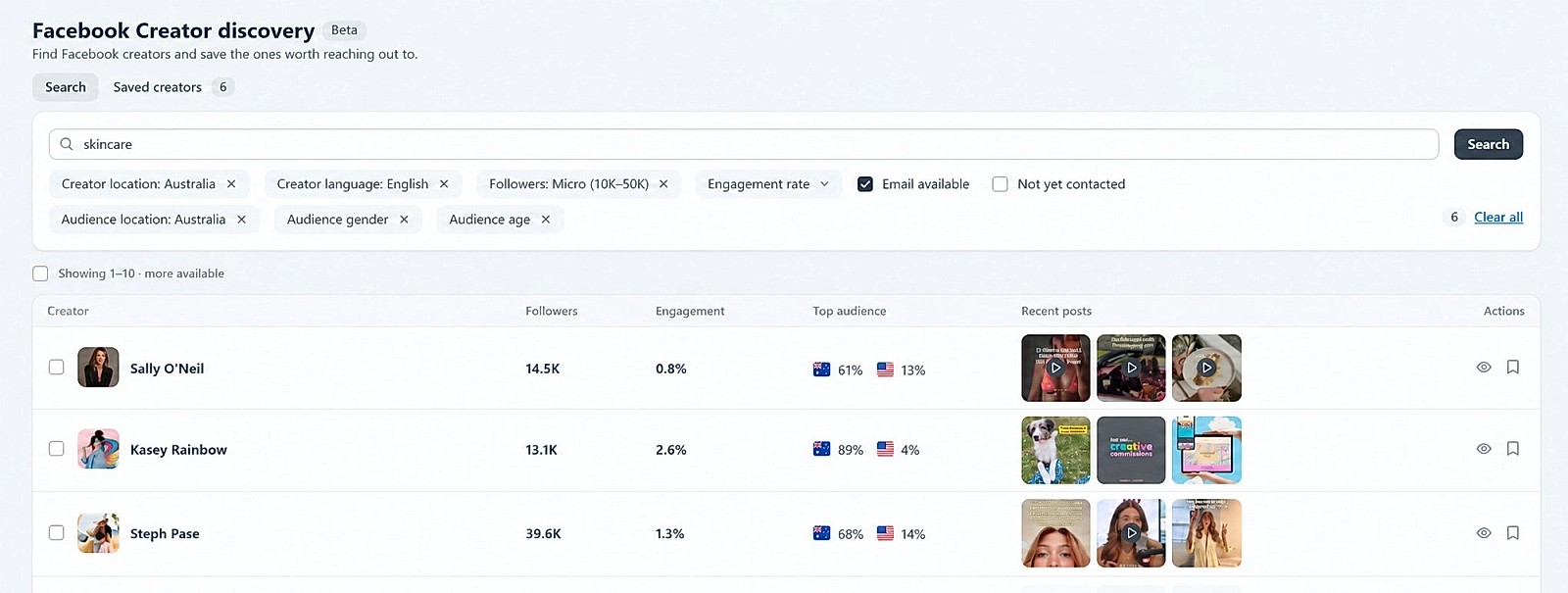
Facebook creator search finds creators through Meta. You connect a published Facebook Page and a business account verified by Meta; no ad spend is needed. Filters cover keyword, creator location and language, followers, engagement rate, whether an email is available, whether you've contacted them, and the audience's location, gender and age.
The data comes from Meta itself: its Creator Marketplace API describes it as authenticated, real-time first-party data, so follower counts, views and audience figures are Meta's own numbers rather than third-party estimates.
You save creators and send each one an invitation email from BixGrow, using a template with tips to personalize it. Creators who join appear in your affiliate list, and the Saved tab shows who you've invited.
| Aspect | UpPromote Creator Discovery | BixGrow Facebook creator search |
|---|---|---|
| Price | Add-on: $39 (35 profile views) or $79 (75 views) a month; 5 free searches without it | Beta → no price yet |
| Networks | Instagram, TikTok, YouTube | Facebook creators, through Meta |
| Where the data comes from | Not stated in the docs | Meta's own first-party data |
| Setup | ❌ | A Facebook Page and a business verified by Meta |
| Audience filters in search | Location (the docs don't say whether creator or audience) | Audience location, gender and age |
| Creators you can email | Filter for creators with an email on file | Filter for creators with an email |
| Fake-follower check | Estimate in each full report | BixGrow's creator data comes from Meta's creator pool: only creators who opted in and meet Meta's program criteria, with Meta's own authenticated data |
| Outreach | ❌ | Invitation emails, with outreach status |
Even. Both tools are new: UpPromote's Creator Discovery launched in July 2026, and BixGrow's Facebook creator search is still in beta. UpPromote covers more networks, while BixGrow uses Meta's own data and sends invitations from the app.
User experience
UpPromote
The registration page editor offers three templates: Basic, Trendy and Comfort.
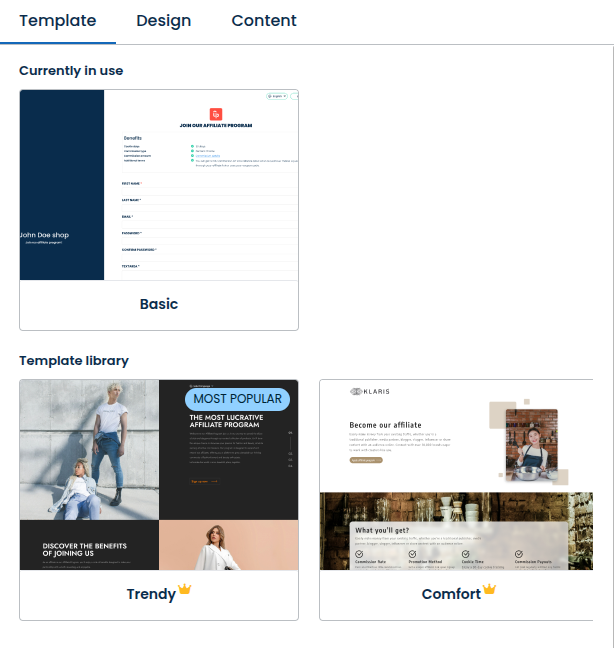
Its sections are an introduction, up to five benefits, the sign-up form and up to four FAQs, and the two premium templates let you reorder them. You can change images and colors, add custom CSS, and turn on Google Translate and CAPTCHA. Each program gets one registration page.
Affiliates log in to an account with tabs for the dashboard, commissions, payments, their network, marketing tools, settings and a guide. The dashboard offers a product-link generator, links tagged by traffic source and a performance graph. You can brand the login page, set colors, add a guide and choose languages, with deeper changes through custom CSS; the account runs in 12 languages.
BixGrow
The Modern landing page is built from sections: Hero, Benefits, How it works, Social proof, FAQ and Final CTA, plus a header and footer.
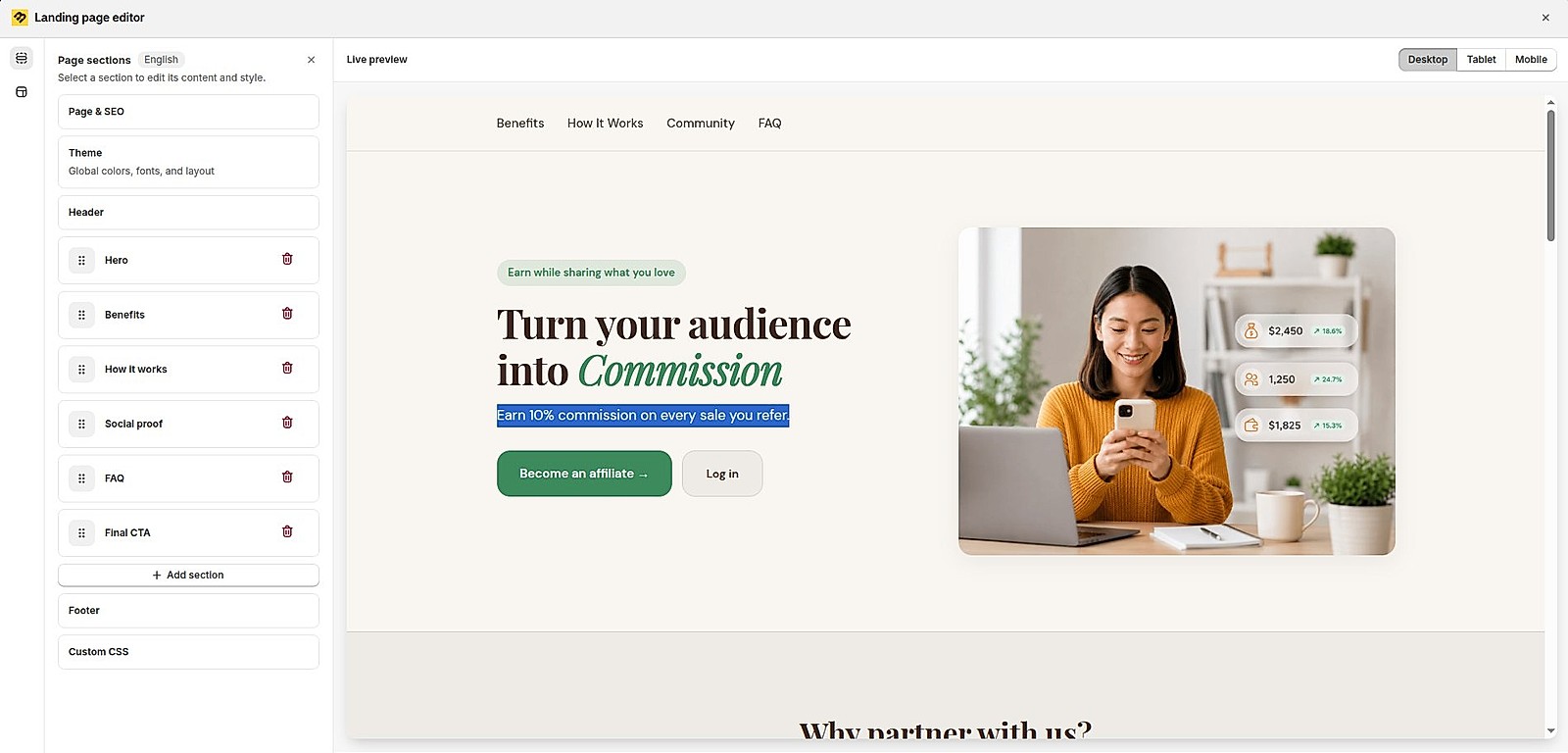
You add, remove and drag sections, choose a layout for each one, and can add a commission slider that lets applicants see what they could earn. Theme presets, colors, Google or custom fonts, spacing and custom CSS set the look.
You can create several sign-up pages per program, each with its own fields, design and approval method. The affiliate admin was recently rebuilt with a new interface: you set colors, fonts, logo and buttons without code, show or hide any section or item, and edit every line of text. The portal can sit inside your Shopify theme and shows a language menu.
| Aspect | UpPromote | BixGrow |
|---|---|---|
| Landing page sections | 4 set sections; reordering in 2 templates | 6 section types plus header and footer; add, remove and reorder |
| Layout per section | Set by the template | Chosen per section |
| Earnings preview | ❌ | Commission slider |
| Sign-up pages per program | One | Several, each with its own fields and approval |
| Dashboard styling | Colors, login page, guide page, custom CSS | Colors, fonts, logo, buttons; show or hide items; edit all text |
Ahead: BixGrow. You get more control over the page that turns visitors into affiliates, and a dashboard you can restyle without code; UpPromote's affiliate account lists 12 languages.
Build an affiliate page that matches your brand
Start from a landing page theme, customize every section with a live preview, and restyle the affiliate dashboard to fit your store. Free plan available.
Affiliate management and payouts
UpPromote and BixGrow both pay affiliates through PayPal or with discount codes for your store, by hand or on a schedule.
The difference is store credit: BixGrow pays into the affiliate's Shopify store-credit balance, while UpPromote's "store credit" is a wallet that affiliates turn into discount codes, which is what BixGrow calls store coupons.
| Aspect | UpPromote | BixGrow |
|---|---|---|
| Automated payouts | PayPal and store credit (same with store coupon in BixGrow) | PayPal, Shopify store credit and store coupons |
| In-app payouts | PayPal, Wise and store credit (discount codes) | PayPal, Shopify store credit and store coupons |
| External payouts | ✓ (Bank transfer, debit card, Payoneer or other custom methods) | ✓ (Bank transfer, debit card, Payoneer or other custom methods) |
UpPromote
UpPromote pays store credit as store discount codes that affiliates can only spend in your store. With self-redemption on, commissions collect in a wallet, and the affiliate creates a coupon for any amount within the limits you set. Since August 2025, store-credit auto-payout can pay on approval, on a set date or on a cycle, with minimum and maximum limits and a summary email 12 hours before.
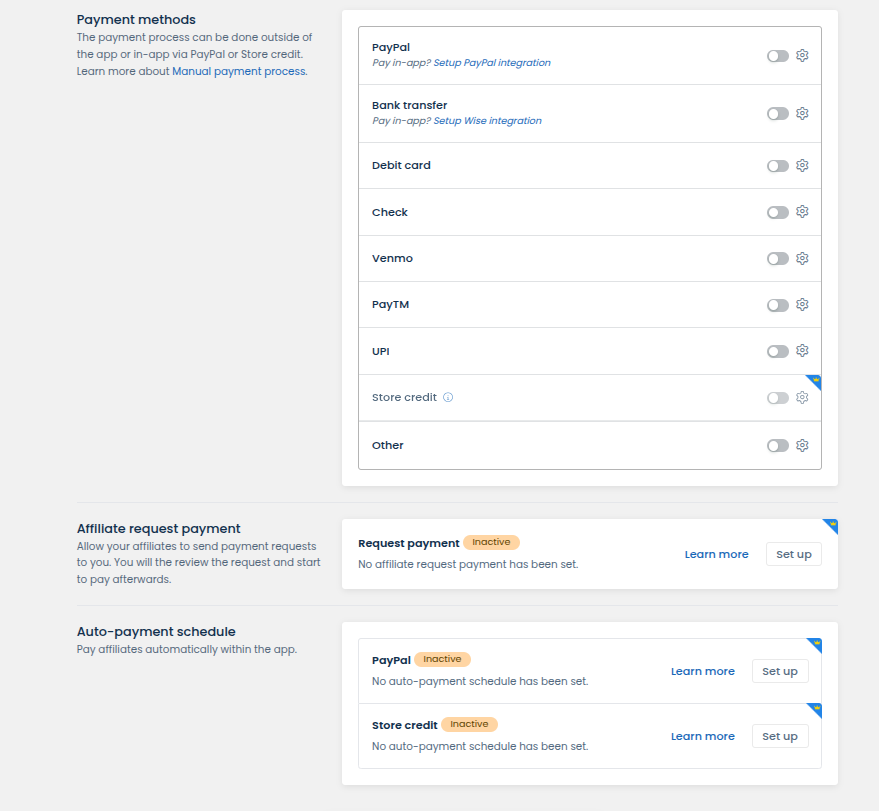
PayPal payouts can also run on a schedule. Wise bank transfers are paid from inside the app, one at a time or in bulk, but not automatically. For any other method, you pay outside the app and mark the payment as paid, and it shows in the affiliate's account.
BixGrow
BixGrow pays store credit into Shopify's own store-credit balance: affiliates see it in their customer account on your store and apply it at checkout, with no code to copy or share. Automated store-credit payouts run weekly or monthly, with an optional review window to cancel before payment and minimum and maximum amounts.
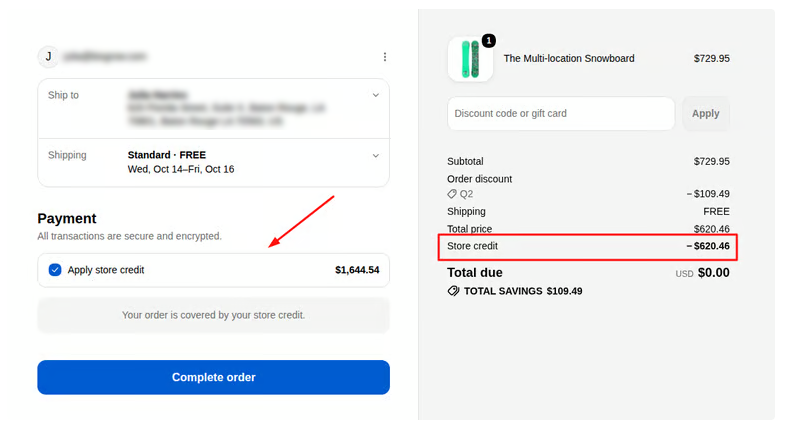
PayPal payouts and store coupons, which work like UpPromote's store credit, can be automated too. For bank transfers or any other method, you pay outside the app and mark the payout as paid, and it shows in the affiliate's dashboard. BixGrow also collects W-9 forms from US affiliates.
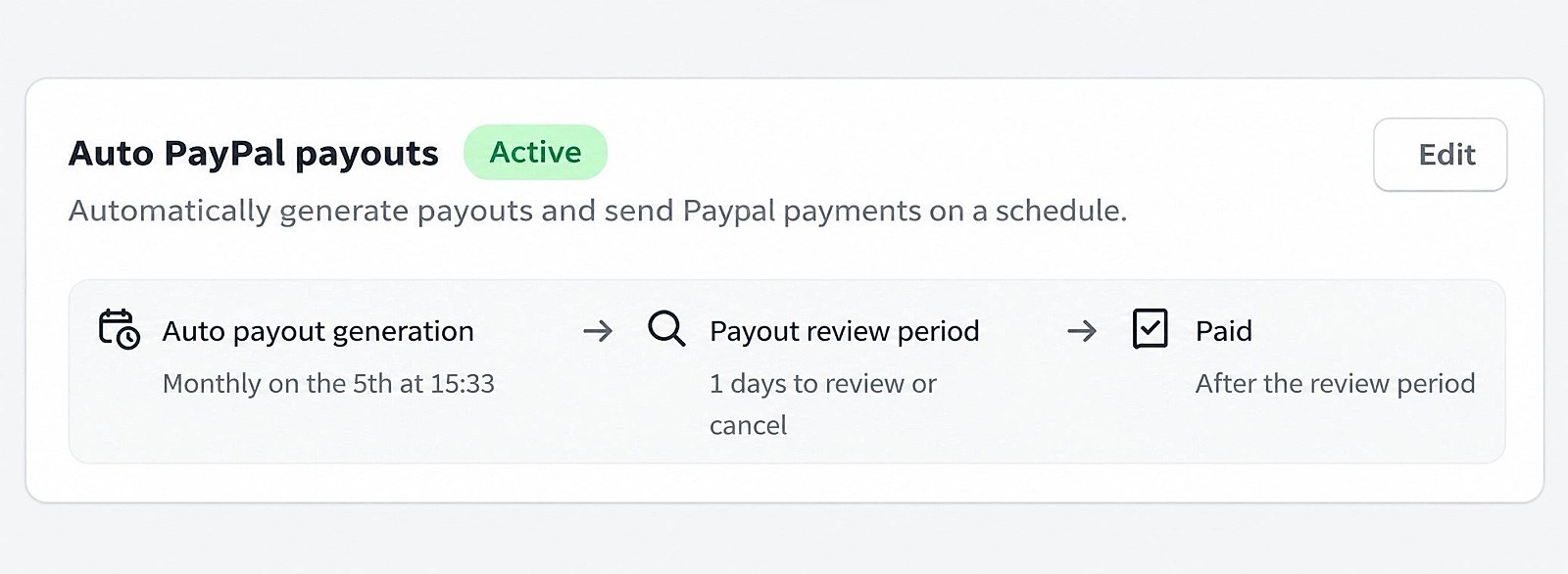
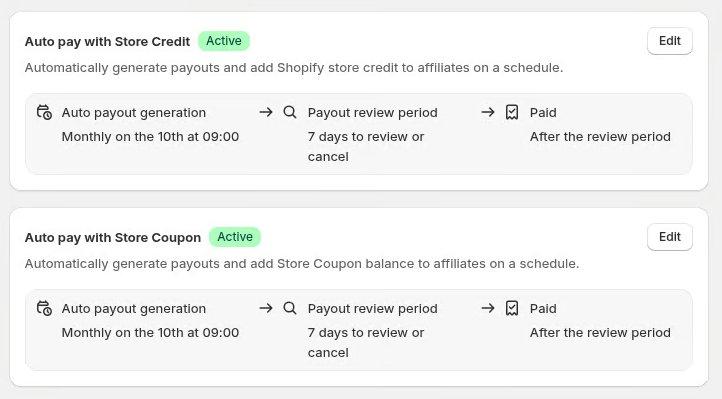
Ahead: BixGrow, because it pays real Shopify store credit and automates three payout methods. UpPromote's Wise integration helps if you want to send bank transfers from inside the app.
Fraud protection
UpPromote and BixGrow include the same core fraud checks on every plan, including Free.
- Stop affiliates earning on their own purchases
- Catch repeat orders from one IP address
- Flag orders that came from Google Ads traffic
- Let only affiliates from countries you choose sign up
The differences are small. UpPromote screens more at sign-up, with an email blocklist, repeat sign-up and bot checks, and an option to hide the form from search engines, and its changelog added social-account verification by bio code in October 2026. BixGrow shows which rule stopped each denied order.
Even. The core checks match; UpPromote adds more screening at sign-up, while BixGrow explains every denied order.
Referral program
Both UpPromote and BixGrow run a customer refer-a-friend program.
UpPromote runs inside its affiliate system and customers claim rewards as coupons, while BixGrow's is a program of its own that calculates and delivers rewards automatically, as Shopify store credit, discount codes or free products, with its own fraud rules and automated emails.
BixGrow
The referral program has its own setup, separate from affiliate programs. Customers join through a floating widget, a post-purchase widget or a custom page, and see their referrals, sales and rewards in a referral block in their Shopify customer account.
Rewards go out automatically:
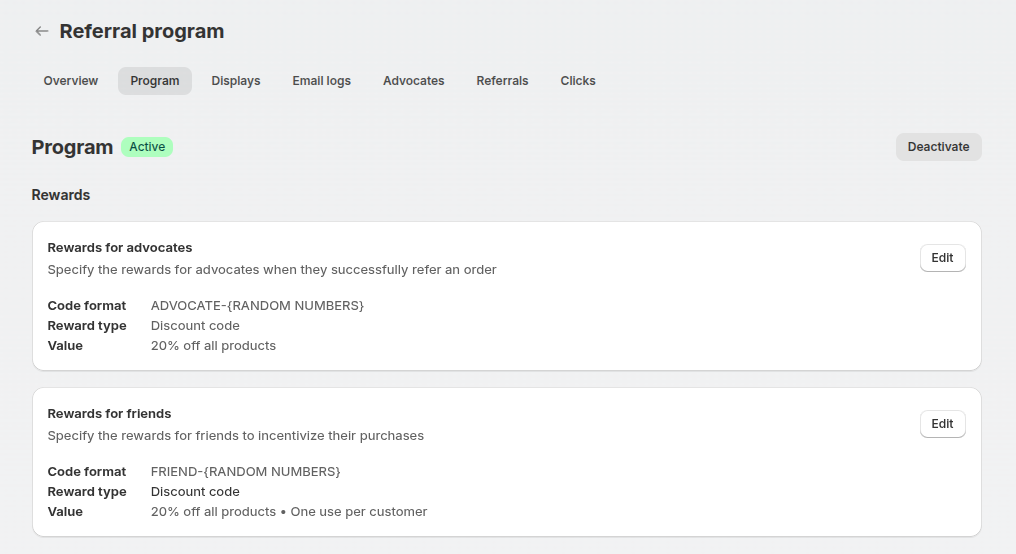
- Shopify store credit worked out as a percentage of the friend's order or a fixed amount and added to the customer's balance
- Discount code sent right away or after a delay you set, or a free product.
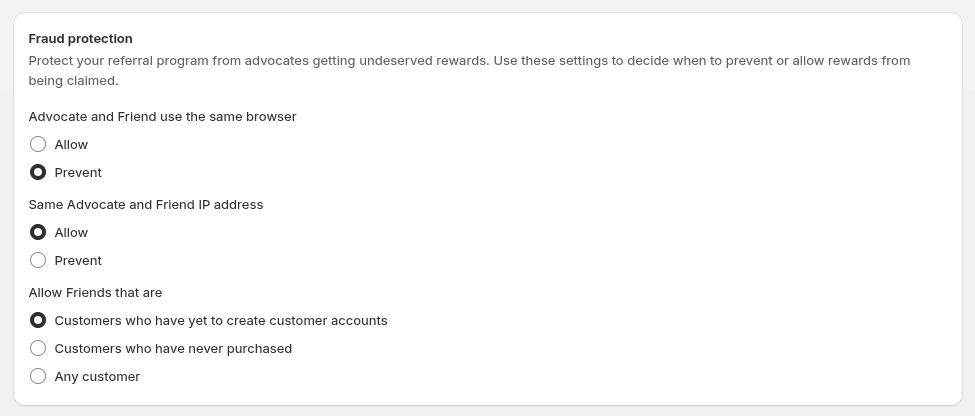
Its settings block rewards when the customer and friend share a browser or IP address, can limit rewards to friends who have never bought, and tag referral orders and customers in Shopify.
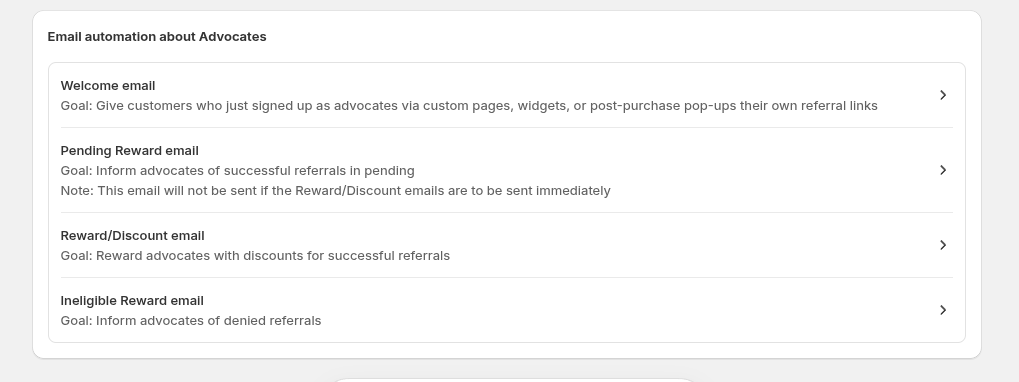
Four automated emails cover welcome, pending reward, reward delivered and not eligible.
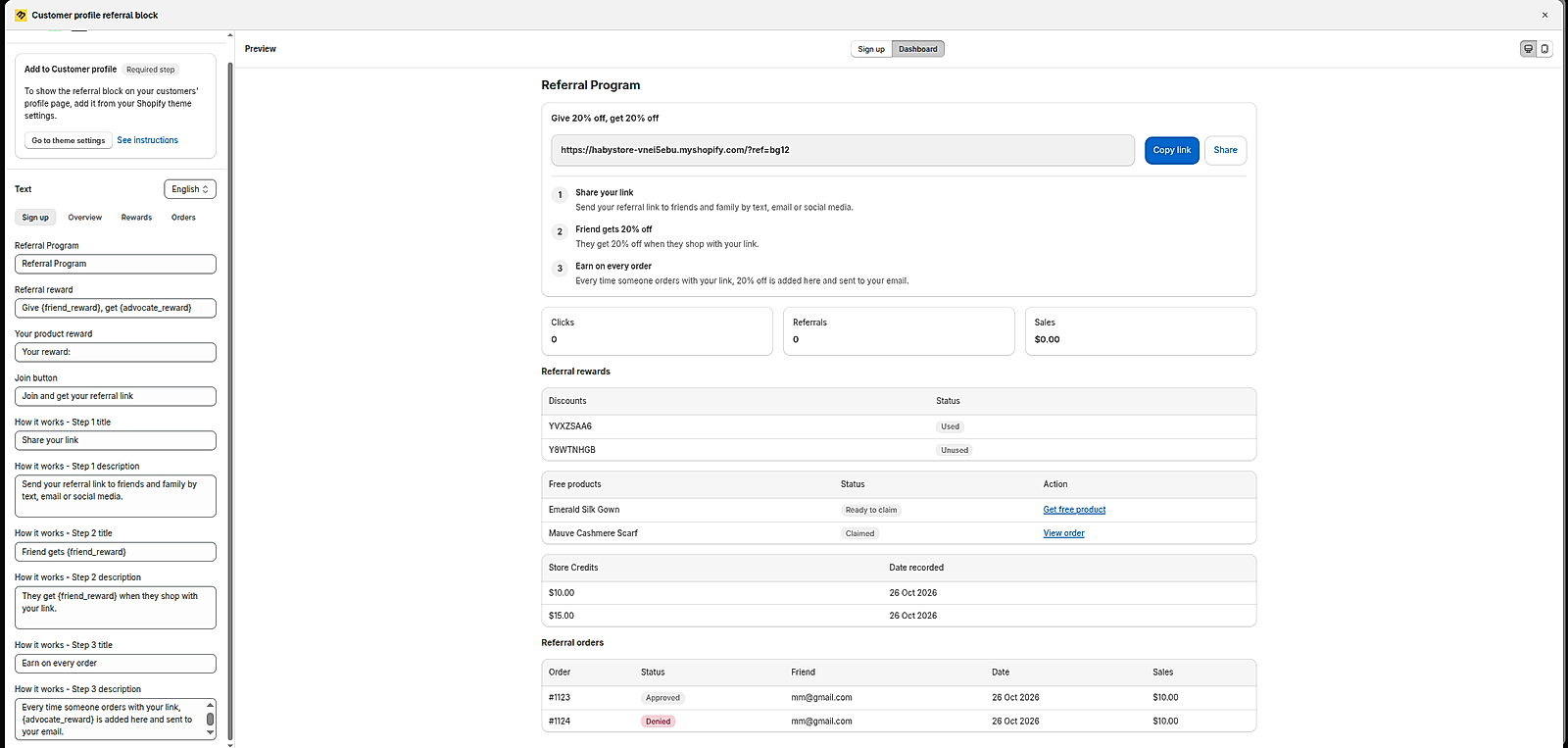
BixGrow has a Customer profile referral block, built for advocates to track and manage their referrals. You turn it on under Referral program > Display, and advocates can log in to their customer account on your Shopify store.
There, advocates track their performance, including total referrals, total sales and order numbers, and claim their rewards:
UpPromote
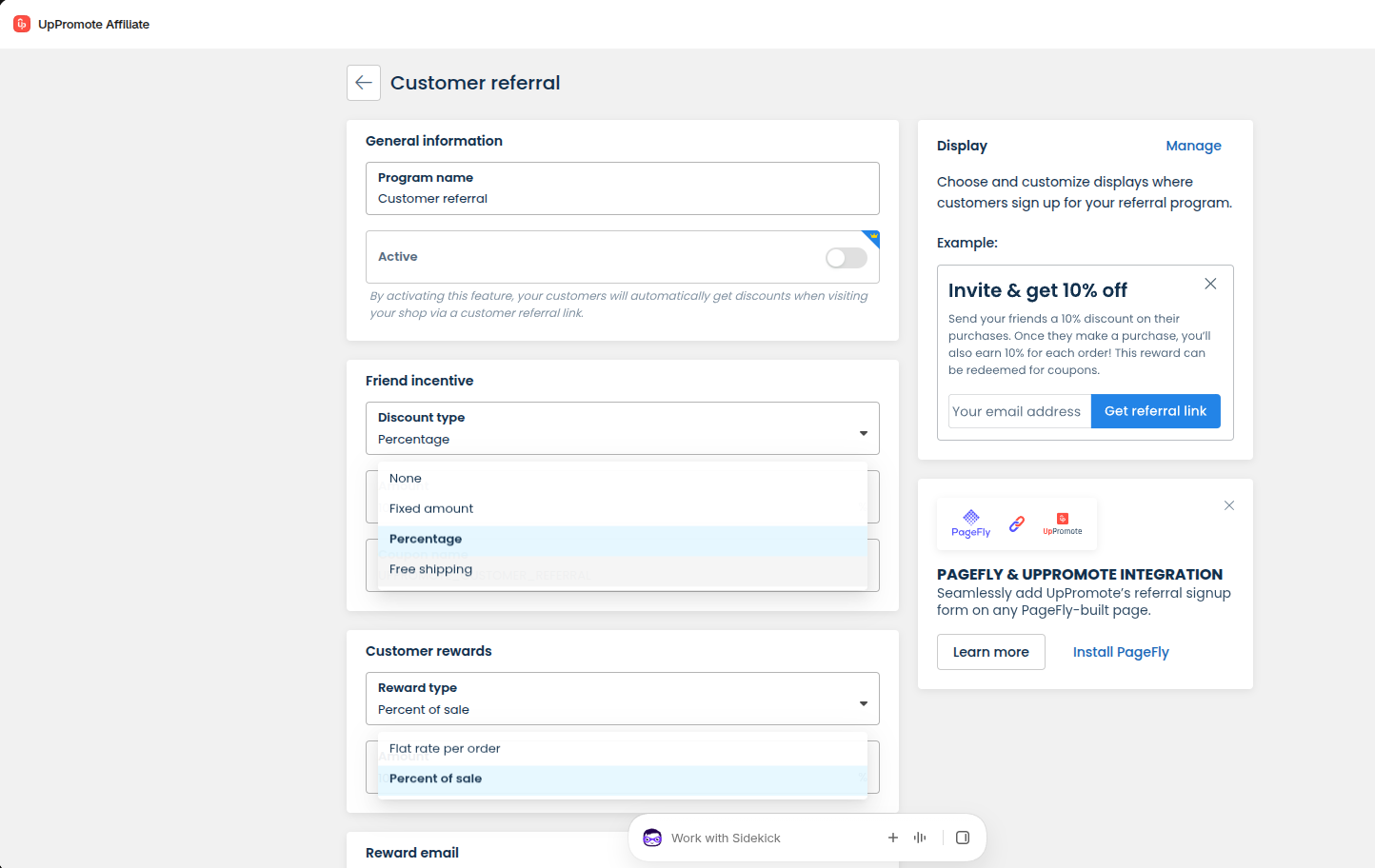
While different from BixGrow, UpPromote’s customer referral runs as a special program inside the affiliate system.
Customers join through a widget, a post-purchase sign-up or an embedded form, and earn a flat amount or a share of each referred order. They claim rewards as coupon codes from a portal linked in the reward email, and the friend gets a fixed or percentage discount, or free shipping. UpPromote's docs describe no referral-specific fraud rules.
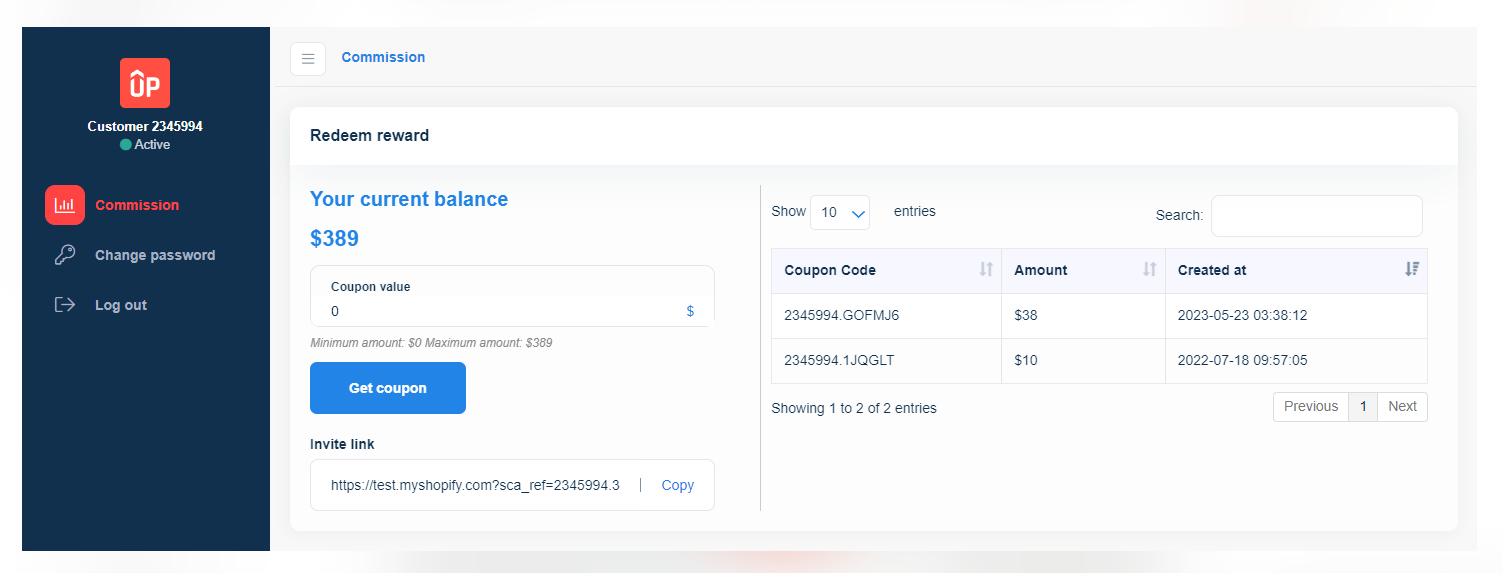
UpPromote advocates use a separate UpPromote portal rather than a tab in their Shopify customer account. They reach it through the "Redeem your reward" button in the reward email, which is sent once a referral is approved and paid, and sign in the first time with a temporary password. The portal shows their total referrals and commissions and is built mainly for redeeming: advocates turn their balance into coupon codes to shop in your store. UpPromote's docs describe no order history or detailed referral stats for advocates there.
| Aspect | UpPromote | BixGrow |
|---|---|---|
| Rewards for advocates | Flat rate per order, Percent of sale | Discount codes, Free product or Shopify store credit |
| Reward for the friend | Fixed amount, percentage, free shipping or no discount | Percentage or fixed discount |
| Where customers track rewards | A separate UpPromote portal, opened from the reward email | A Customer profile referral block in their Shopify customer account |
| Referral fraud rules | ❌ | Same browser, same IP and eligible-friend rules |
| Customer emails | Reward email once a referral is approved and paid | 4 automated emails |
| Advocate portal | Separate login with a temporary password; shows total referrals and commissions, and turns the balance into coupon codes | Inside the Shopify customer account; tracks total referrals, sales and order numbers, and claims discount codes, store credit or free products |
Ahead: BixGrow, for rewards delivered automatically as store credit, codes or free products, plus its own fraud rules and automated emails; UpPromote can offer friends free shipping.
Scaling and integrations
UpPromote can connect several Shopify stores to one main store and links to more apps, while BixGrow runs one setup per store.
UpPromote
Connect multiple stores and sync what you choose, such as programs, affiliates and their payment details, coupons, MLM networks and fraud settings, and affiliates use one referral code across every connected store. UpPromote sends affiliate profiles and 14 events, such as new referrals and payouts, to Klaviyo for automated flows; for Mailchimp and Omnisend, its docs describe syncing the affiliate list only.
Other integrations include Facebook pixel, postback URLs, Wise, page builders, the API and an MCP server.
BixGrow
BixGrow has no multi-store option: each store installs the app and runs its own programs, affiliates and payouts. It syncs approved affiliates to Klaviyo and Mailchimp and sends 11 events to both, such as new and approved referral orders, new coupons and payouts, so you can run campaigns and automated flows from either tool.
It also adds UTM tags for Google Analytics 4 and offers event webhooks and an API; the Shopify App Store listing names Appstle, Klaviyo, Mailchimp, PayPal and Seal Subscriptions as integrations.
| Aspect | UpPromote | BixGrow |
|---|---|---|
| Several Shopify stores | Connected to a main store, with sync | ❌ |
| Email marketing | Klaviyo: profiles and 14 events; Mailchimp and Omnisend: affiliate list | Klaviyo and Mailchimp: affiliate list and 11 events |
| Subscription apps | A switch for Recharge, Loop, Skio, Appstle, Seal, Bold and Recurpay | Appstle and Seal built in; other apps that tag their orders |
| Ad and analytics tracking | Facebook pixel, postback URLs | UTM tags for Google Analytics 4 |
| Headless and non-Shopify tracking | Headless Shopify tracking via a script from support. | Third-party tracking for headless stores (incl. Hydrogen) and non-Shopify sites |
| Developer access | API and MCP | Event webhooks and API |
Ahead: UpPromote. It is the only one of the two that runs several stores from one account, and it connects to more tools, such as Omnisend, Facebook pixel and page builders.
Pricing
Prices below were checked on each app’s official pricing page in October 2026. Apps change their plans often, so confirm current details before you install.
| Plan level | UpPromote | BixGrow |
|---|---|---|
| Free | Free: reviews up to $3,000 in referral sales a month, any number of affiliates | Starter: 30 affiliates and 50 referral orders a month; marketplace listing |
| Entry | Growth, $29.99 + 2%: unlimited programs, customer referral, marketplace listing, store-credit payouts | Scale, $19.99: unlimited affiliates and orders, referral program, lifetime and coupon-based commission, discount applied from the link |
| Advanced tools | Professional, $89.99 + 1.5%: anti-leak discounts, tiers, MLM, subscription renewals, PayPal auto-payout | Pro, $29.99: anti-leak coupons, tiers, MLM, subscription renewals, PayPal and store-credit payouts, custom domain |
| Top | Enterprise, $199.99 + 1%: several stores, coupon-based commission, unlimited staff | Advanced, $49.99: automated PayPal, store-credit and store-coupon payouts, API |
UpPromote's sales fee lands on your Shopify bill as a monthly usage charge. Past the free plan's limit, referrals are still tracked but can't be approved until you upgrade (review limits). Annual billing takes about 17% off UpPromote's plan price, though the sales fee stays, and 10–15% off BixGrow's.
What would a typical store pay?
Three example stores, each on the cheapest plan that covers what it needs:
| Store and monthly affiliate sales | What it needs most | UpPromote cost/mo | BixGrow cost/mo |
|---|---|---|---|
| Candle shop: 25 affiliates, 40 orders, $2,400 | Links and codes | Free: $0 | Starter: $0 |
| Skincare brand: 25 affiliates, $5,000 | Anti-leak coupons and commission tiers | Professional: $89.99 + 1.5% × $5,000 = $164.99 | Pro: $29.99 |
| Apparel brand: 150 affiliates, $25,000 | MLM, tiers, anti-leak and automated PayPal payouts | Enterprise: $199.99 + 1% × $25,000 = $449.99 | Advanced: $49.99 |
The candle shop pays nothing on either app: its 25 affiliates and 40 orders fit BixGrow's free plan, and its $2,400 in sales fits UpPromote's. Over a year, BixGrow saves the skincare brand $1,620 and the apparel brand $4,800; at $25,000 a month, Enterprise already costs less than Professional ($464.99).
These figures leave out payout fees, the commissions you pay affiliates, taxes and UpPromote's Creator Discovery add-on.
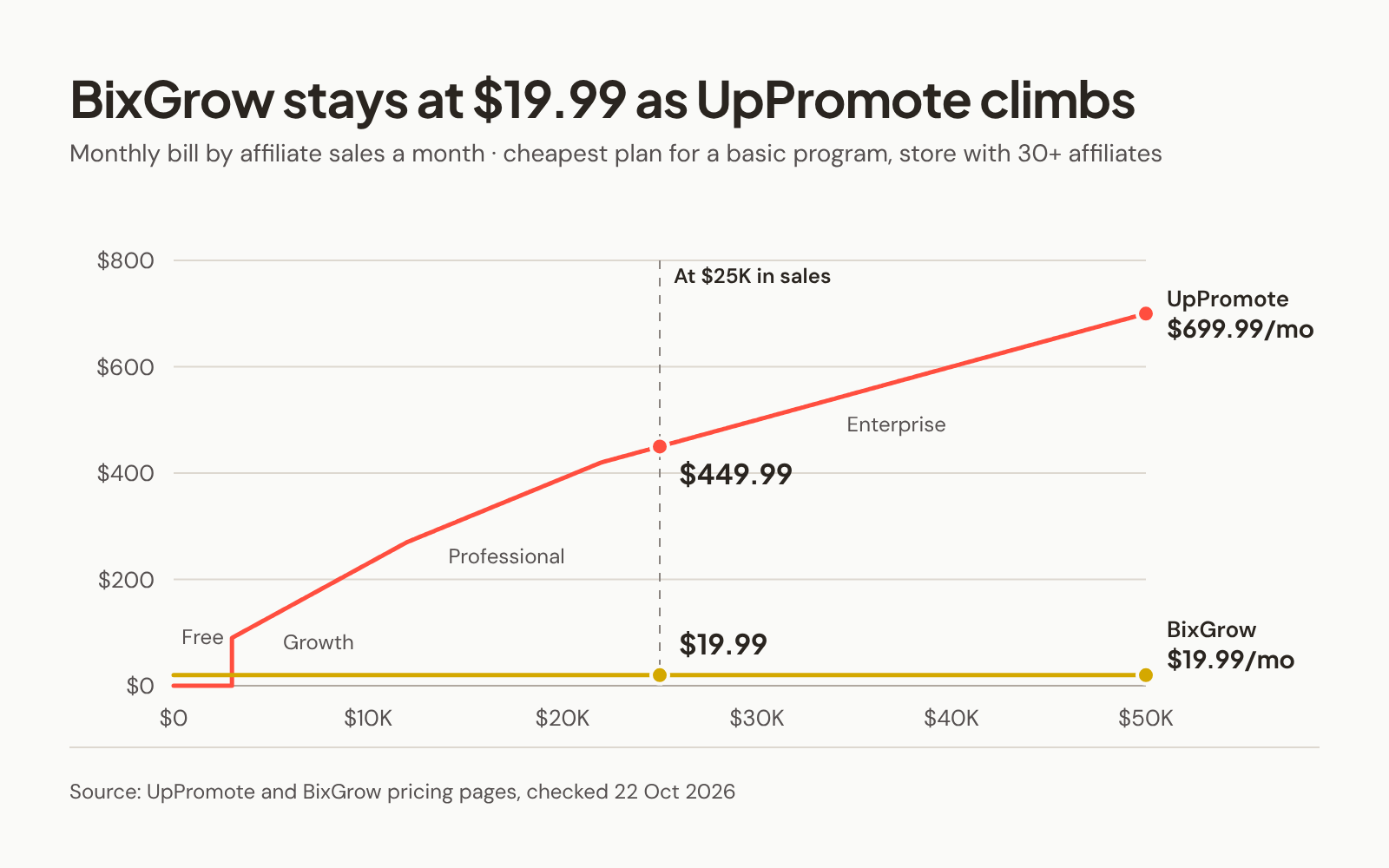
Ahead: BixGrow, once a program passes UpPromote's free cap, because its price doesn't grow with sales. UpPromote's Free plan is the cheaper start for a small program with more than 30 affiliates.
Final thoughts
Feature for feature, BixGrow and UpPromote are closer than their prices suggest. Both run a full affiliate program inside Shopify, so the choice comes down to how many stores you run and how you want to recruit and pay affiliates.
On price, BixGrow costs less once you pay, because its price doesn't grow with your sales, while UpPromote's free plan goes further if you have more than 30 affiliates (see Pricing).
Choose UpPromote if you:
- Run several Shopify stores and want one shared program
- Want to send bank transfers through Wise from inside the app
- Need creator search on Instagram, TikTok or YouTube today and accept a paid add-on
Choose BixGrow if you:
- Run one store and want a flat monthly price that doesn't grow with referral sales
- Want a landing page you design section by section, with a commission slider, and a dashboard styled to your brand
- Want a refer-a-friend program that rewards customers automatically, as a share of the order or a fixed amount, with its own fraud rules and automated emails
Before you decide, run the numbers on your own affiliate sales. The gap between a flat fee and a percentage looks small at first, but it widens with every sale. For most Shopify stores still growing their program, that makes BixGrow the smarter long-term investment.
The scorecard
Information checked October 2026. Each row sums up the matching section above.
| Category | UpPromote | BixGrow | Ahead |
|---|---|---|---|
| Pricing | Free, Growth $29.99 Professional $89.99 Enterprise $199.99 a month, plus 2%, 1.5% or 1% of approved referral sales | Free, Scale $19.99 Pro $29.99 Advanced $49.99 a month, Custom from $50; no fee on sales | BixGrow |
| Commission options | ✓ Same toolkit | ✓ Same toolkit | Even |
| Tracking and coupon leaks | ✓ Same toolkit | ✓ Same toolkit | Even |
| Recruiting affiliates | Creator search: paid add-on from $39/mo Networks: Instagram, TikTok, YouTube Data: source not stated Outreach: ❌ | Creator search: beta, no price yet Networks: Facebook Data: Meta's first-party data Outreach: invitation emails from the app | Even |
| Affiliate experience | Landing page: 3 templates with 4 set sections Earnings preview: ❌ Sign-up pages: one per program Dashboard: colors, login page, custom CSS; 12 languages | Landing page: section builder with a layout per section Earnings preview: commission slider Sign-up pages: several per program Dashboard: rebuilt; colors, fonts, logo, show or hide items, edit all text | BixGrow |
| Referral program | Setup: separate referral program Advocate rewards: flat rate or percent of sale, redeemed as coupons Where advocates track: separate portal from the reward email Fraud rules: ❌ | Setup: separate referral program Advocate rewards: store credit, discount codes or free products, sent automatically Where advocates track: referral block in their Shopify customer account Fraud rules: same browser, same IP, eligible friends | BixGrow |
| Affiliate management and payouts | Automated: PayPal and store credit In-app: PayPal, Wise and store credit External: mark as paid Store credit: a wallet turned into discount codes | Automated: PayPal, store credit and store coupons In-app: PayPal, store credit and store coupons External: mark as paid Store credit: Shopify's own store-credit balance | BixGrow |
| Fraud protection | Core checks: ✓ Extra: more sign-up screening (email blocklist, bot checks, social verification) | Core checks: ✓ Extra: reason shown for each denied order | Even |
| Scaling and integrations | Multi-store: ✓ with sync Email: Klaviyo 14 events; Mailchimp and Omnisend list only Subscription apps: 7 Developer access: API and MCP | Multi-store: ❌ Email: Klaviyo and Mailchimp, 11 events Subscription apps: Appstle and Seal built in, others that tag orders Developer access: webhooks and API | UpPromote |
FAQs
Turn customers into your best marketers
Run affiliate and referral programs in one Shopify app, with a flat monthly price and no fees on your affiliate sales.