

Do you know exactly which affiliate should get credit for each sale? Tracking decides who gets paid and which partners you invest in, and small gaps add up to overpaid commissions and frustrated affiliates.
Shopify merchants usually track affiliates in two ways:
- Affiliate links credit the sale when a shopper clicks the affiliate's link and then buys.
- Coupon codes credit the sale when a shopper types the affiliate's code at checkout.
This guide shows where each one breaks, how to use them together, and who gets paid when both land on the same order.
TL;DR
• Use both. Links work where people can click. Codes work where they can't, like videos, podcasts and offline, and across devices.
• Each has a weak spot. Links lose credit when the cookie is lost: Safari's 7-day limit, device switches, in-app browsers. Codes leak to coupon sites, so you pay commission on sales you'd have made anyway.
• One order pays one affiliate. When a link and a code meet, BixGrow checks the lifetime link first, then the code, then the last link clicked.
What credited 10,000 affiliate orders
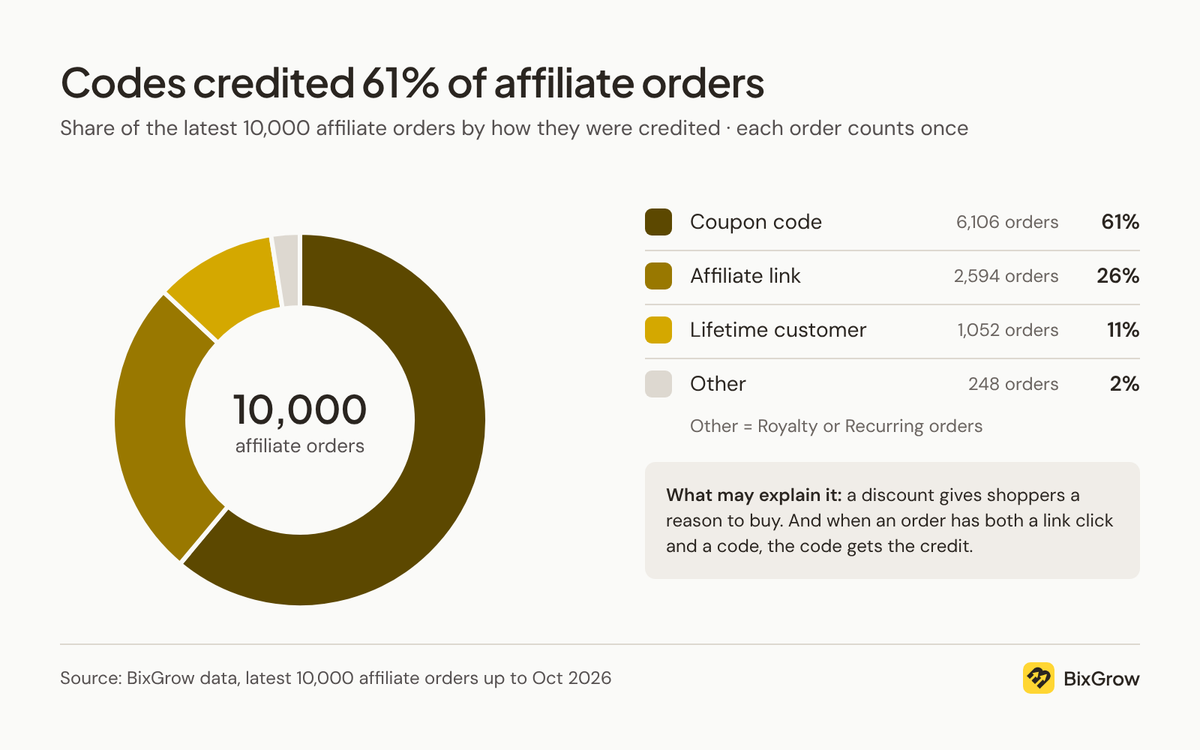
In the latest 10,000 affiliate orders across BixGrow stores, coupon codes credited 61% and affiliate links 26%. Lifetime customer links, which keep crediting repeat buyers to the affiliate who first referred them, credited another 11%, and the last 2% came from royalty and recurring orders.
Why codes credit most orders
Two things push codes ahead:
- A code comes with a discount. Shoppers have a reason to find it and type it, so it rarely gets skipped.
- A code wins ties. When an order has both a link click and a code, most apps, BixGrow included, credit the code. Some of the 61% started with a link click.
So the split doesn't mean links don't work. It shows which rule had the final say on each order. A very high code share can also be an early sign that codes are leaking, which we cover below.
How affiliate link tracking works
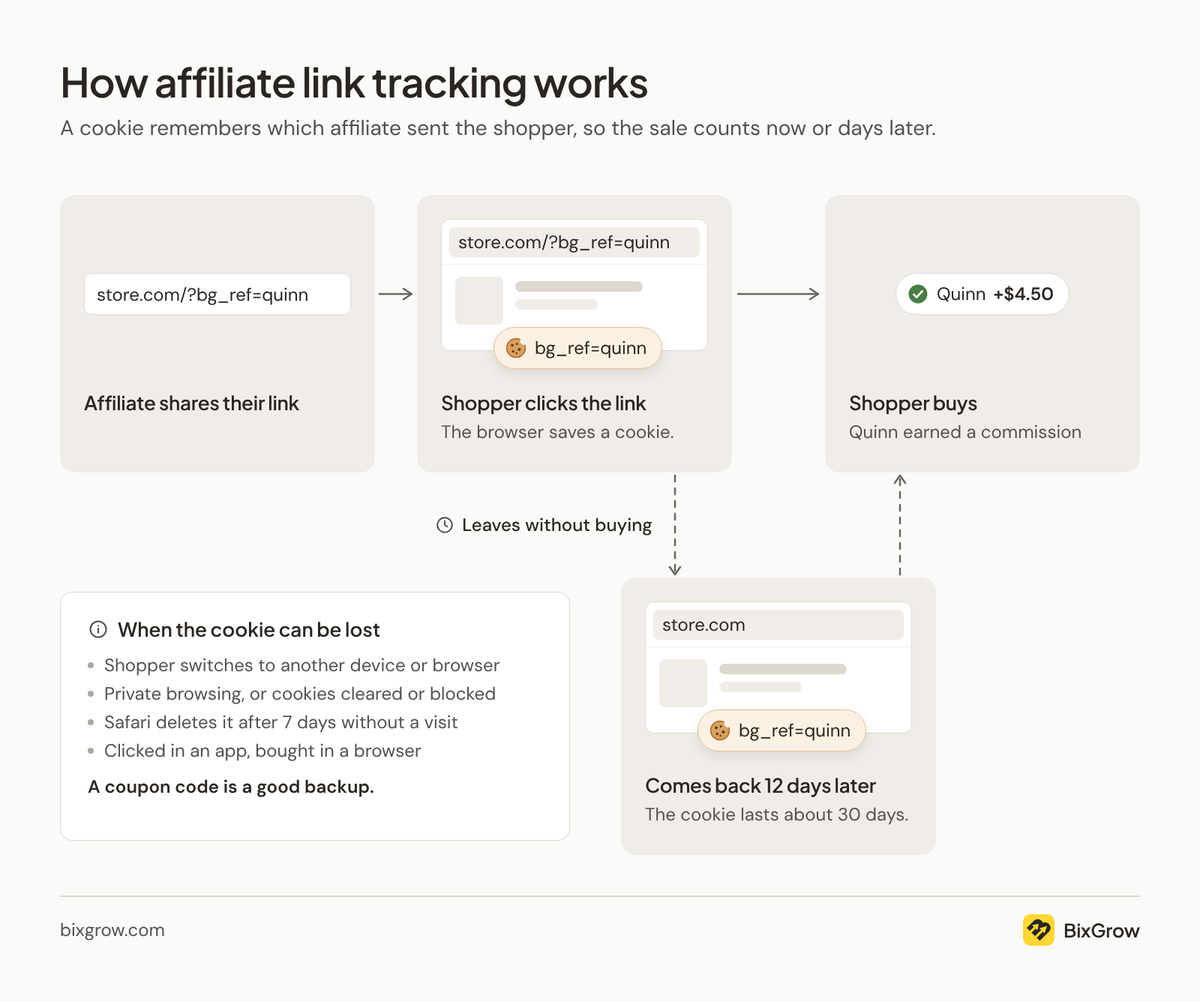
Each affiliate gets a unique link with their own ID code, for example yourstore.com/?bg_ref=quinn. When a shopper clicks it, a small file called a cookie is saved in their browser. The cookie records which affiliate sent them.
Most shoppers don't buy on their first visit, so the cookie stays in place for a set period. If the shopper comes back and places an order before it expires, the sale is credited to that affiliate and they earn a commission.
With BixGrow, you choose how long the cookie lasts. It can be anything from 24 hours to 90 days or more, and 30 days is common. A longer window gives affiliates more time to earn from the traffic they send.
If the cookie expires, or the shopper clears their browser data, the sale can't be linked back to the affiliate.
Note: Safari on iPhones and Macs can delete this cookie after 7 days if the shopper doesn't return to your store. Giving affiliates a coupon code is a good backup.
Why do affiliate links miss sales? device switches, in-app browsers, lost cookies and blocked tracking
- They switch devices. They tap the link on their phone, then buy later on their laptop. The cookie only exists on the phone.
- They leave the app's browser. Links opened in Instagram or TikTok load inside the app. If the shopper later opens your store in Safari or Chrome to buy, the cookie isn't there.
- The cookie is gone. It expired, or the shopper cleared cookies or browsed in private mode. Safari also deletes cookies like these after 7 days.
- They blocked tracking. In places with cookie banners, like the EU and UK, tracking waits until the shopper clicks Accept. Some ad blockers also stop tracking scripts.
Should you add UTM parameters to affiliate links?
Adding UTM parameters to affiliate links is worth it if you use Google Analytics. UTMs are tags at the end of a link that tell GA4 who sent each visitor, so you can see affiliate traffic and sales next to your ads and emails. They don't decide who earns the commission. The affiliate link or coupon code still does that.
Without UTMs, GA4 usually files an affiliate's visitors under the site they clicked from, like Instagram, or as direct traffic. You can't tell which affiliate sent them.
Example: Quinn is a skincare blogger in your affiliate program. You add three tags to Quinn's link:
| Tag | What it tells GA4 | Quinn's value |
|---|---|---|
| utm_source | Who sent the visitor | quinn |
| utm_medium | What kind of traffic it is | affiliate |
| utm_campaign | Which program or promotion | summer-ambassadors |
Before: yourstore.com/?bg_ref=quinn
After: yourstore.com/?bg_ref=quinn&utm_source=quinn&utm_medium=affiliate&utm_campaign=summer-ambassadors
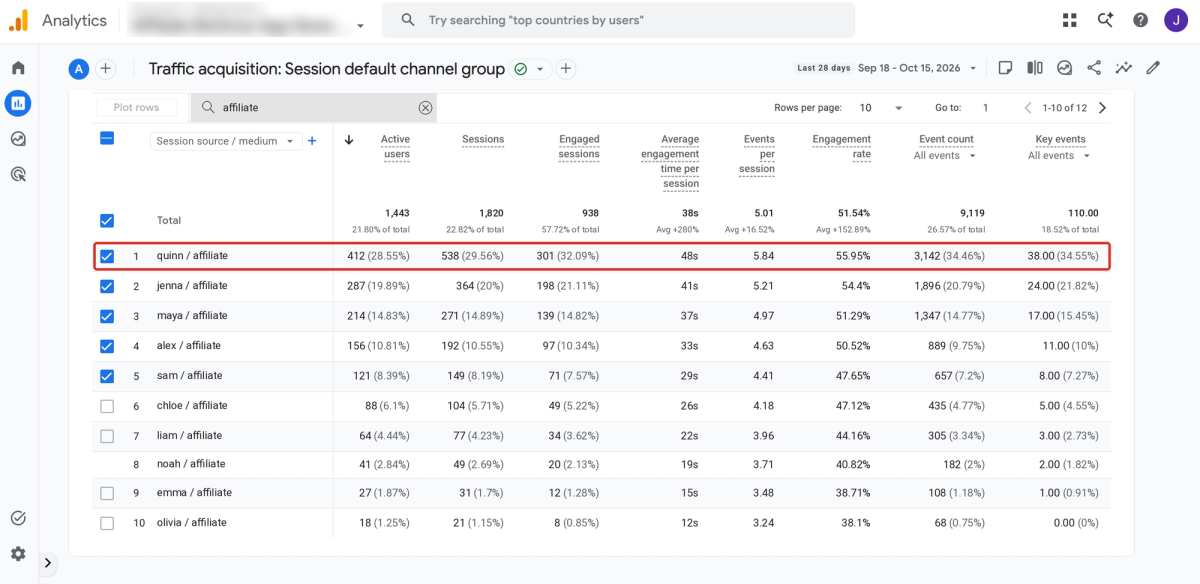
In GA4, go to Reports > Acquisition > Traffic acquisition and switch the table to Session source / medium. Quinn's visits show up as "quinn / affiliate". If your store sends orders to GA4, Quinn's purchases and revenue appear on the same row.
Two tips from Google's UTM guide:
- Use all three tags. A missing one shows up as "(not set)" in your reports.
- Keep values lowercase and spelled the same way. GA4 treats "Quinn" and "quinn" as two different sources.
You don't have to tag each link by hand. BixGrow can add UTMs to every affiliate link automatically and fill in each affiliate's name for you.
How discount code tracking works on Shopify
Discount code tracking credits a sale to the affiliate whose code the shopper types at checkout. In BixGrow, you assign each affiliate their own discount code, and every order that uses it is credited to them. No click or cookie is needed.
For example:
- You give Quinn the code QUINN15 for 15% off.
- Quinn mentions it in a video. A week later, a viewer types QUINN15 at checkout on a different device.
- The order is credited to Quinn, because the code is Quinn's.
Because there's no cookie, codes work where links fail: across devices, in podcasts and videos, on printed flyers, and when a shopper declines cookies. The catch is that codes travel. Once QUINN15 lands on a coupon site or browser extension, Quinn gets credit for shoppers Quinn never reached. A shopper who forgets to type the code isn't credited to anyone. And every tracked sale comes with a discount, which cuts into your margin.
How do you stop affiliate codes from leaking to coupon sites?
Why codes leak
- Shoppers post codes they've used on coupon sites and deal forums.
- Coupon extensions like Honey pick up codes typed at checkout and offer them to other shoppers.
- Some affiliates post their own codes on coupon sites to earn more commission.
Why it's a problem
Say QUINN15 lands on a coupon site. A shopper who was already about to buy sees it pop up at checkout, takes 15% off, and Quinn earns commission. You've paid a discount and a commission on a sale you would have made anyway.
Your reports suffer too. Quinn looks like a top performer, even though many of those orders came from strangers. And if the shopper first clicked another affiliate's link, many affiliate apps give the sale to the code, so the affiliate who actually sent them loses out.
The fix: anti-leak coupons
BixGrow's anti-leak coupons replace the code with the affiliate's link. You set the discount as usual, but no code is created. When a shopper clicks Quinn's link, the discount is applied automatically at checkout and shows in the order summary. Shoppers who arrive any other way don't get it, so there's nothing for coupon sites or extensions to pick up.
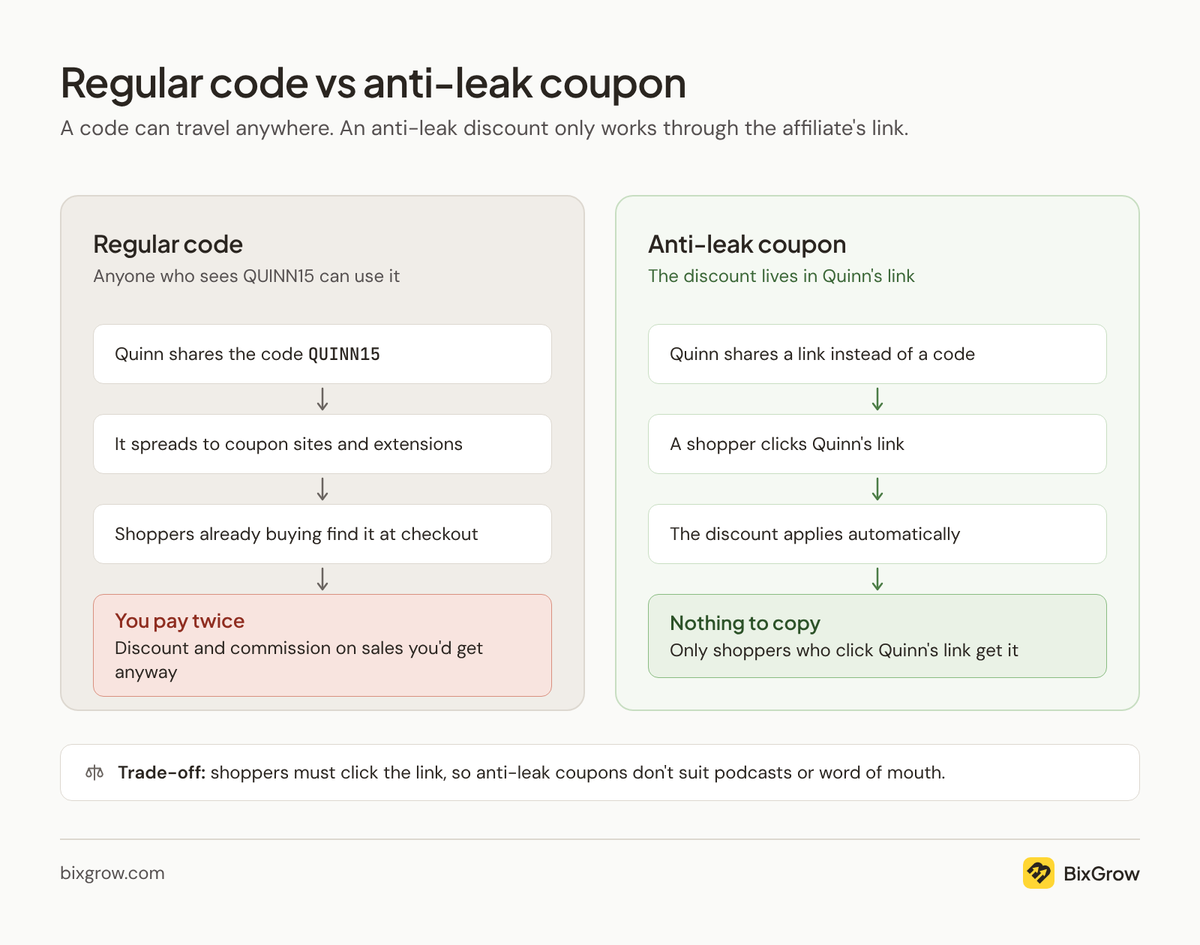
The trade-off is that shoppers have to click the link to get the discount, so it won't work for podcast mentions or word of mouth. Turning it on also hides affiliates' existing codes from their dashboard, and you can't assign new codes while it's on. It suits programs where affiliates share links on social media, blogs and email.
Which method works best for different affiliate channels?
The best tracking method for each affiliate channel depends on what the audience does next. People reading on a screen click, so give them a link. People listening, watching or offline remember a code, so give them a code.
| Channel | Main method | Pair it with | Why |
|---|---|---|---|
| Blogs, review sites & newsletters | Affiliate link | Coupon code | Readers click naturally; a code catches those who come back later on another device |
| YouTube | Link in the description | Spoken coupon code | Many viewers never open the description or watch on TV |
| Facebook & X | Affiliate link | Coupon code | Links in posts are clickable; a code covers video viewers and screenshots shared without the link |
| Instagram posts & Reels, TikTok | Coupon code | Link in bio | Captions aren't clickable, but a code on screen sticks |
| Instagram Stories | Link sticker | Coupon code | The sticker is tappable, but Stories disappear after 24 hours, so a code helps people who buy later |
| Affiliate link | Code on the pin image | Pins click through to the product, but people often save them and buy weeks later | |
| WhatsApp & SMS | Affiliate link | Coupon code | Links in messages are tappable; a short code still works when friends pass the tip on in person |
| Podcasts | Coupon code | Short link in show notes | Listeners hear the code and type it in later |
| Customer referral programs | Referral link | Reward code for the friend | The link credits the referrer; the discount gets the friend to order |
| Events, print & packaging | Coupon code | QR code of the affiliate link | No clicks offline; a QR code turns a scan into a tracked visit |
What about UTMs? Add UTM tags to any link in this table to see which channel each visit came from in Google Analytics. They won't change who earns the commission, because the link or code still decides that.
Tip: use links that apply the code automatically. When a shopper clicks, the discount is already in their cart, so nobody forgets to type the code. Shopify can create a shareable link for any discount code that applies it automatically at checkout. BixGrow can also auto-apply an affiliate's code when a shopper arrives through their link.
Link and code on one order: who earns the commission?
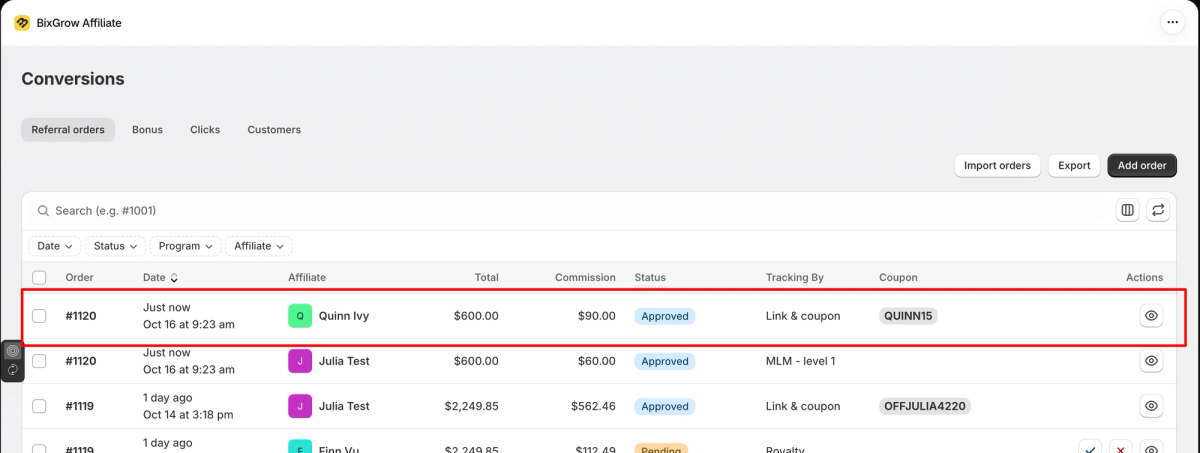
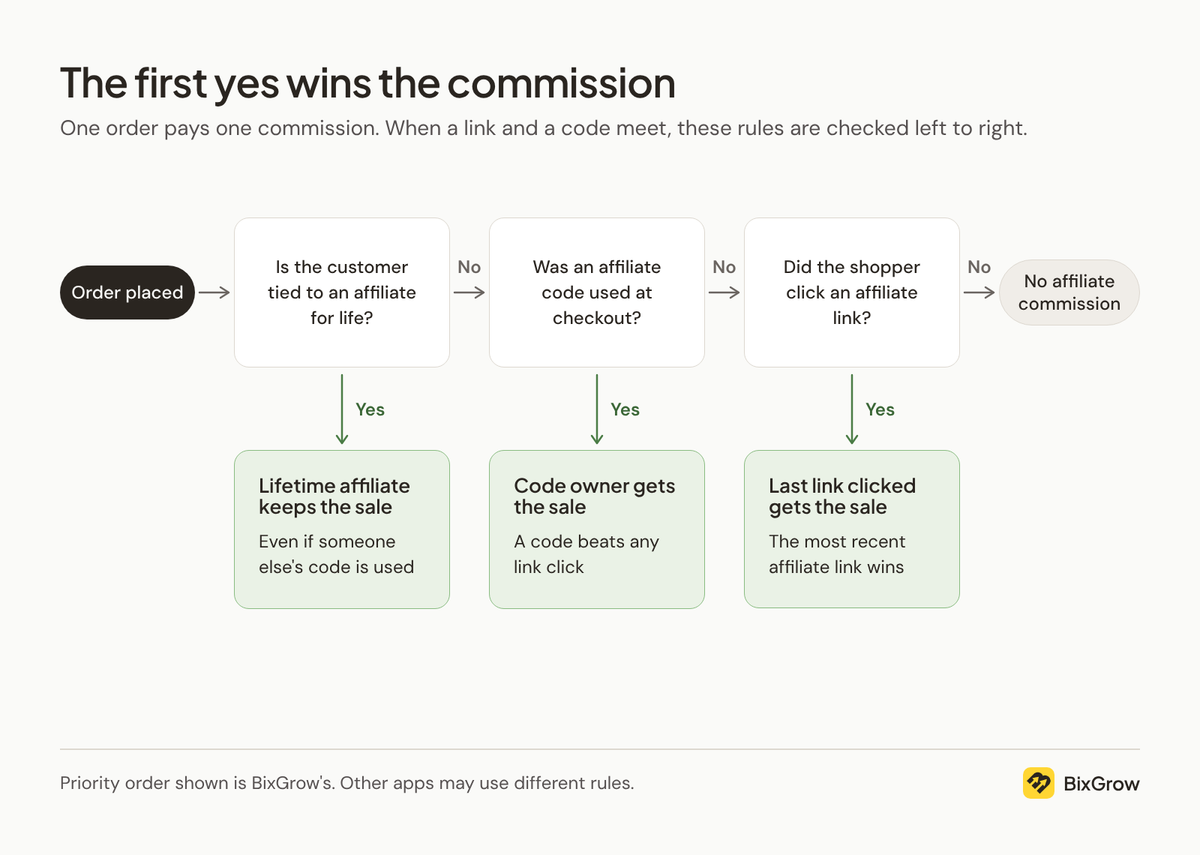
An order can carry a link click and a coupon code at the same time. The affiliate app still pays one commission, not two, and a priority rule picks who gets it. In BixGrow and many other apps, the code wins, because typing it at checkout is the shopper's last deliberate step. The one exception is a customer already tied to an affiliate for life.
- Same affiliate: a follower clicks Quinn's link, then types QUINN15 at checkout. Quinn earns one commission, at the code rate if you pay a different rate for code sales.
- Different affiliates: a shopper clicks Jenna's link but types QUINN15 at checkout. Quinn gets the commission, even though Jenna sent the shopper. This is the most common complaint about mixing links and codes, and it's often a sign that Quinn's code has leaked.
A typical priority order, using BixGrow's as the example:
- Lifetime link. A lifetime link ties a customer to the affiliate who referred their first order. After that, every order they place goes to that affiliate, even if they use someone else's code or click another link.
- Coupon code. The code beats any link click.
- Last link clicked. If the shopper clicked several affiliates' links, the most recent one wins.
Why don't my affiliate app, Shopify and Google Analytics match?
Your affiliate app, Shopify and Google Analytics count different things, so their numbers rarely match.
- Your affiliate app counts orders credited to an affiliate through a link or code, using its priority rules.
- Shopify and GA4 credit each order to the source of the shopper's visit. A sale made with a code but no click shows up as direct traffic, even though the app credits the affiliate.
- GA4 can't see visits from shoppers who decline cookies or block tracking, but the order still appears in Shopify.
Key takeaway
Affiliate links, coupon codes and UTM parameters aren't competing options. Each answers a different question. Links and codes tell you who earned the sale, and UTMs tell you where it came from. Tracking breaks down when you rely on only one of them.


